
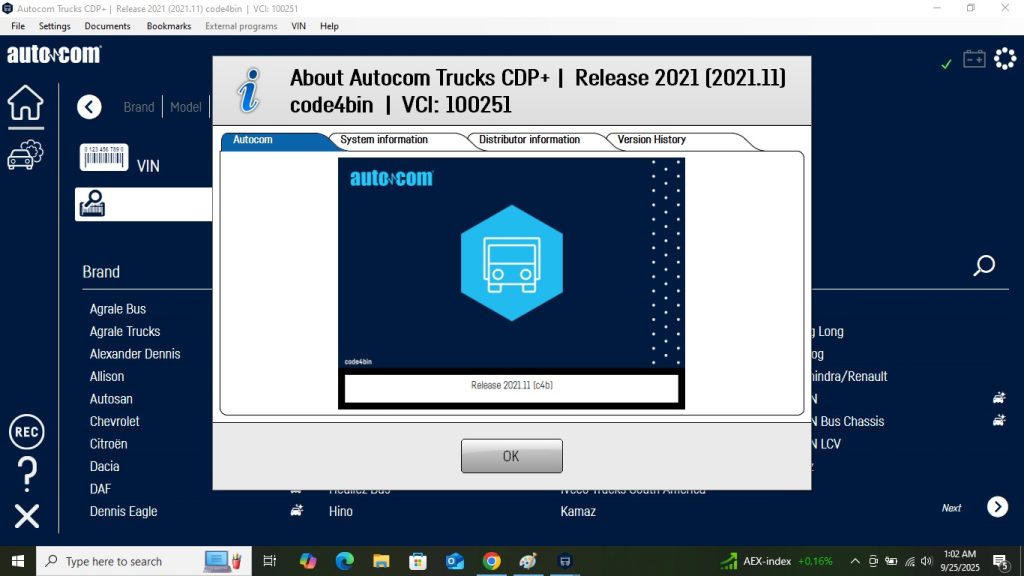
Autocom 2021 is a multi-brand منصة التشخيص covering a comprehensive range of passenger cars, light المركبات التجارية, و heavy-duty trucks من a single التركيب. Unlike OEM-specific tools, Autocom يوفر broad coverage بدون requiring separate software لـ each manufacturer — making it a practical choice لـ independent ورش العمل handling diverse المركبات lineups. يغطي هذا الدليل what Autocom 2021 can do, how إلى install it, و how إلى get reliable results across its full المركبات range.
What Is Autocom 2021?
Autocom is a احترافي multi-make منصة التشخيص developed لـ independent ورش العمل. Version 2021 يوفر access إلى hundreds of المركبات brands عبر a single interface, communicating via J2534 or proprietary VCI adapters.
Key functions
- Fault code read/clear — all الأنظمة across all supported brands, including proprietary manufacturer-specific codes
- Live data — real-time sensor readings, freeze frame data, و graphing across all ECUs
- Actuator tests — force المكونات إلى activate لـ testing بدون disassembly
- Service resets — oil service, brake pad wear indicator, DPF reset, و service interval resets
- Basic coding — module coding و adaptation لـ replacement parts on supported platforms
- Truck diagnostics — يدعم major heavy-duty brands including Volvo, Scania, MAN, Mercedes, DAF, و Iveco
Vehicle Coverage
| الفئة | Brands Covered |
|---|---|
| European passenger cars | VW, Audi, BMW, Mercedes, Volvo, Peugeot, Citroën, Renault, Fiat, Alfa Romeo, Opel |
| Asian passenger cars | Toyota, Lexus, Honda, Nissan, Mitsubishi, Hyundai, Kia, Mazda, Subaru |
| American cars | Ford, GM, Chrysler, Jeep, Cadillac, Dodge |
| Light commercials | Transit, Sprinter, Ducato, Vivaro, Trafic, Crafter |
| Heavy trucks | Volvo, Scania, MAN, Mercedes Actros, DAF, Iveco, Renault Trucks |
System المتطلبات و Installation
System المتطلبات
- Windows 10 64-bit recommended (Windows 7 64-bit also supported)
- 4 GB RAM minimum, 8 GB recommended
- 20 GB free disk space
- USB 2.0 or USB 3.0 لـ VCI connection
الخطوة 1 — Disable Antivirus Temporarily
Autocom’s licence و database files are frequently flagged as false positives by Windows Defender و third-party antivirus software. Temporarily disable real-time protection قبل التركيب و restore it بعد the first successful launch.
الخطوة 2 — Install as Administrator
Right-click the installer و select Run as Administrator. Choose Full Installation إلى يتضمن all المركبات databases, الأنظمة modules, و the VCI interface drivers. Partial installs leave out specific brand databases, reducing coverage.
الخطوة 3 — Install VCI Drivers
After the main application installs, connect your Autocom VCI interface و يتيح Windows إلى detect it. If the driver ليس found automatically, install it manually من the Autocom التركيب directory under drivers. Confirm the VCI appears in Device Manager بدون error flags.
الخطوة 4 — Activate و Launch
Launch Autocom من the desktop. On first run, the activation wizard will prompt لـ your licence credentials. Enter them و يتيح the software إلى validate. Once activated, the المركبات selection screen will appear — select your المركبات category, manufacturer, model, و year إلى begin diagnostics.
Autocom vs OEM Tools — What إلى Expect
Autocom covers a breadth of المركبات that no single OEM tool can match. However, it لا reach the depth of manufacturer-specific tools لـ advanced functions. For routine diagnostics, service resets, و live data on most المركبات, Autocom performs well. For deep ECU coding, البرمجة, or accessing hidden adaptation channels on VAG Group المركبات, a dedicated tool like ODIS Service + Engineering يوفر capabilities Autocom cannot replicate. Similarly, لـ Toyota/Lexus-specific initialisation و immobilizer functions, Toyota Techstream V18 goes deeper than any multi-brand tool.
Common Issues و Fixes
VCI Not Recognised
If Autocom cannot find the VCI on startup, check that the VCI drivers are properly installed و that the USB device appears in Device Manager بدون warning flags. Try a different USB port, preferably USB 2.0 directly on the motherboard rather than a hub.
Vehicle Database Not Found
This usually occurs مع partial installations. Reinstall using the Full Installation option و ensure the database files are not blocked by antivirus quarantine.
Coding Functions Greyed Out
Some coding و البرمجة functions يتطلب a higher-tier Autocom licence. Confirm your licence level و whether the specific function is included in your version.
Get Autocom 2021
Unlimited PC installations. Full المركبات database included. Ready إلى run on Windows 10 straight من download.
Get Autocom 2021 – Multi-Brand Diagnostic →
For Toyota و Lexus diagnostics specifically, the Toyota Techstream V18 VMware VM يوفر full OEM access مع pre-configured settings — no manual setup required.