
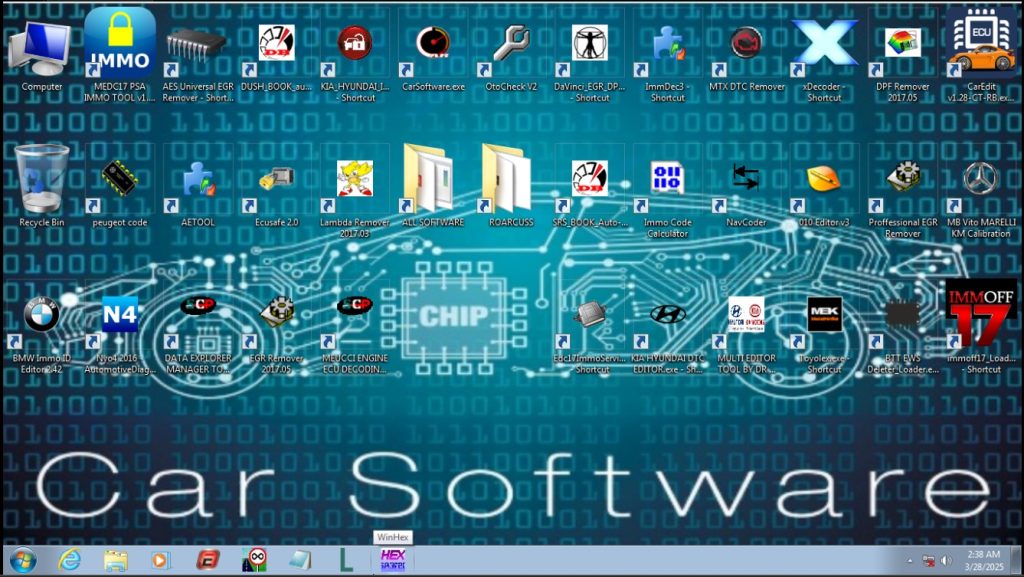
The Car Software Collection VMware is a pre-installed virtual المعدات containing over 160 automotive diagnostic, tuning, و البرمجة tools in a single ready-إلى-run environment. Instead of sourcing, installing, و configuring dozens of separate tools individually — each مع its own dependencies, activation requirements, و compatibility quirks — this collection puts everything في one Windows 7 VM that opens in VMware و works immediately. يغطي هذا الدليل what the collection يتضمن, how إلى set it up, و who it is designed لـ.
What Is Included in the Collection?
The collection spans every major category of automotive software used in احترافي ورش العمل, tuning shops, و diagnostic centres:
OEM Diagnostic Tools
- ODIS Service و Engineering (VAG Group)
- Toyota Techstream (Toyota/Lexus)
- Diagbox (Peugeot/Citroën/DS)
- Autocom و Delphi diagnostic platforms
- Multi-brand OBD tools لـ European و Asian makes
ECU Tuning و Remapping
- WinOLS 4.x — binary ECU editing مع checksum correction
- ECM Titanium — driver-based map identification لـ 26,000+ ECU types
- CrossTuner Studio — ECU tuning platform by MTX Electronics
- Checksum Corrector utility لـ ECU file verification
IMMO, Airbag, و Coding Tools
- ImmoKiller — universal immobilizer removal tool
- Multiple airbag reset tools (EcuVonix, Airbag Service Tool, Bosch reset)
- DASH ECU Teacher — VAG Group dashboard/ECU sync
- AETool — ECU decoding و IMMO OFF
- Various EEPROM dump calculators لـ PIN code extraction
Odometer و Service Tools
- Dashboard Service Tool — multi-brand odometer و service reset
- NYO 4.0 — odometer, radio, airbag, و navigation tool
- Multiple brand-specific cluster tools (BMW, Audi, Opel)
Radio Code و Unlock Tools
- 160+ car radio code unlock collection
- Geza Dump Calculator — universal radio unlock via dump
- Code Calculator Second Edition — Grundig/Philips radio tools
Why a VMware Collection?
Each tool in the collection has its own set of dependencies — specific Windows versions, Visual C++ runtimes, .NET versions, DirectX builds, و activation الأنظمة. Running all of these natively على single Windows 10 or 11 المعدات creates inevitable conflicts. The VMware approach isolates the entire environment: the VM runs Windows 7 مع every dependency pre-installed و every tool pre-configured. You لا install anything — you just open the VM و start working.
For a deeper understanding of why VMware is the standard delivery method لـ برنامج التشخيص, our guide إلى VMware لـ automotive diagnostics explains the compatibility و isolation benefits in detail.
System المتطلبات
- Host OS: Windows 10 or Windows 11 (64-bit)
- RAM: 16 GB host recommended (8 GB allocated إلى VM)
- Storage: 120–150 GB free (the full VM image is large)
- CPU: Intel Core i5 or AMD Ryzen 5 مع VT-x/AMD-V enabled in BIOS
- VMware: Workstation Player 17 (free) or Workstation Pro
Setup Guide
الخطوة 1 — Install VMware Workstation Player
Download و install VMware Workstation Player 17 من VMware’s website. Enable Intel VT-x in your BIOS if not already active. Verify VMware opens بدون errors قبل proceeding.
الخطوة 2 — Extract the VM Archive
Extract the collection archive إلى a drive مع at least 150 GB free. Use a short path بدون spaces — C:AutoSuite is ideal. Extraction takes 15–30 minutes depending on disk speed و archive size.
الخطوة 3 — Open و Configure the VM
Open VMware و select the .vmx file. Before powering on, allocate at least 6–8 GB RAM و 2–4 CPU cores. Set USB إلى 3.0 و network إلى Bridged mode.
الخطوة 4 — Power On و Use
Boot the VM. Windows 7 will load مع all tools accessible من the desktop or Start menu. Connect your diagnostic interface و pass it عبر via VMware’s Removable Devices menu.
For ورش العمل that need individual focused tools rather than the full collection, our guide إلى ODIS Service 25 + Engineering 19 covers the dedicated VAG diagnostic setup in detail.
Get the Car Software Collection VMware
160+ tools. One VM. One download. Everything pre-installed و ready إلى run.
Get Car Software Collection VMware →
Looking لـ a standalone PSA diagnostic solution? The Diagbox 9.129 VMware VM covers Peugeot, Citroën, DS, و Opel مع full OEM access.