
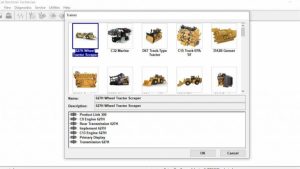
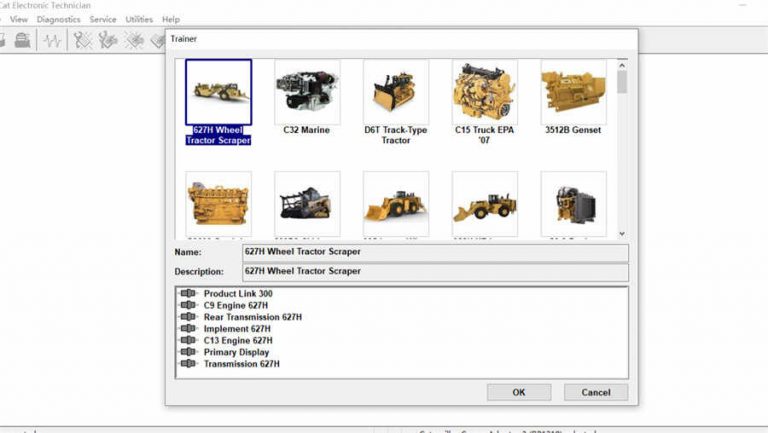
Caterpillar ET (Electronic Technician) 2019C is the الرسمي OEM برنامج التشخيص لـ Caterpillar المحركات و equipment. Used by CAT dealers و certified service centres worldwide, it يوفر the deepest available access إلى CAT diesel المحركات found in heavy-duty construction equipment, trucks, generators, و marine applications. يغطي هذا الدليل what CAT ET does, how إلى install version 2019C, which adapters are required, و how إلى connect إلى the full range of supported equipment.
What Is Caterpillar ET?
CAT Electronic Technician is Caterpillar’s factory منصة التشخيص. It communicates مع CAT ECMs via the 9-pin Deutsch diagnostic connector و يوفر full access إلى every programmable المعلمات, رموز الأعطال, و live data channel in Caterpillar electronic الأنظمة.
Key functions of CAT ET 2019C
- Fault code diagnostics — active, logged, و pending J1939 رموز الأعطال across all ECMs on the equipment
- Live data monitoring — all المحركات sensor values in real time: boost pressure, oil pressure, coolant temperature, injection timing, EGR position
- Bi-directional tests — actuate injectors, fans, throttle, و solenoids إلى verify المكونات operation
- ECM flash البرمجة — update firmware و apply software upgrades من Caterpillar’s المعايرة library
- Parameter البرمجة — modify المحركات ratings, idle speed, progressive shift, PTO settings, و customer-specified المعلمات
- Event log access — review historical data snapshots captured أثناء fault events
Equipment Coverage
| الفئة | Equipment | ET 2019C Support |
|---|---|---|
| On-highway المحركات | C7, C9, C13, C15, C18 truck المحركات | ✅ Full |
| Construction | الحفارات (300–390 series), dozers (D6–D11), wheel loaders (924–988) | ✅ Full |
| Generator sets | C4.4, C9, C15, C18, C32 ACERT generator sets | ✅ Full |
| Marine | C12, C18, C32 marine propulsion و auxiliary | ✅ Full |
| Agricultural | AGCO / Challenger equipment مع CAT power | ✅ Partial |
Required Interface
CAT ET communicates via an RP1210-compatible interface. The following adapters are confirmed working:
- CAT Communication Adapter III (317-7485) — genuine CAT adapter, best compatibility لـ all functions
- Nexiq USB Link 3 — widely used alternative, يدعم J1939 و CAT’s proprietary protocols
- Noregon DLA+ 3.0 — reliable alternative لـ RP1210 communication
- VXDIAG VHDI Truck — budget option, works لـ basic diagnostics و most البرمجة
Installation Guide
System المتطلبات
- Windows 10 64-bit or Windows 7 64-bit
- Intel Core i5, 4 GB RAM minimum
- 10 GB free disk space
الخطوة 1 — Install Interface Drivers
Install your RP1210 adapter drivers قبل running the CAT ET installer. Connect the adapter و confirm it appears in Windows Device Manager بدون warning flags. CAT ET’s setup detects available RP1210 adapters أثناء التركيب.
الخطوة 2 — Run the CAT ET Installer
Launch the installer as Administrator. Select Complete Installation إلى يتضمن all modules, the رموز الأعطال library, و the equipment database. A partial install omits certain equipment categories. Installation takes 10–20 minutes.
الخطوة 3 — Connect إلى Equipment
Connect your interface إلى the 9-pin Deutsch diagnostic connector on the equipment. For trucks مع CAT المحركات, this is typically on the المحركات firewall or inside the cab near the A-pillar. On construction equipment, the connector is usually near the operator station or المحركات compartment. Turn the key إلى On (المحركات off) و launch CAT ET — it will identify the equipment و present the ECM list automatically.
Common Issues و Fixes
ECM Not Found
Verify the RP1210 adapter is correctly configured in CAT ET’s Utilities → Preferences → Communications menu. Ensure the adapter is connected إلى the 9-pin Deutsch port, not the 6-pin AUX connector present on some equipment.
Flash Programming Interrupted
Always use AC power أثناء ECM flash البرمجة. A power loss mid-flash can render the ECM unresponsive. Disable Windows Update و screen saver قبل starting any flash session.
For broader multi-brand commercial fleet diagnostics alongside CAT, see our JPRO 2025 v2 guide which covers CAT-powered trucks within a brand-agnostic platform. For Detroit Diesel-powered equipment, our DDDL 8.19 SP1 guide covers the equivalent OEM tool.
Get Caterpillar ET 2019C
Instant digital download. Full equipment database included — ready إلى install و connect immediately.