
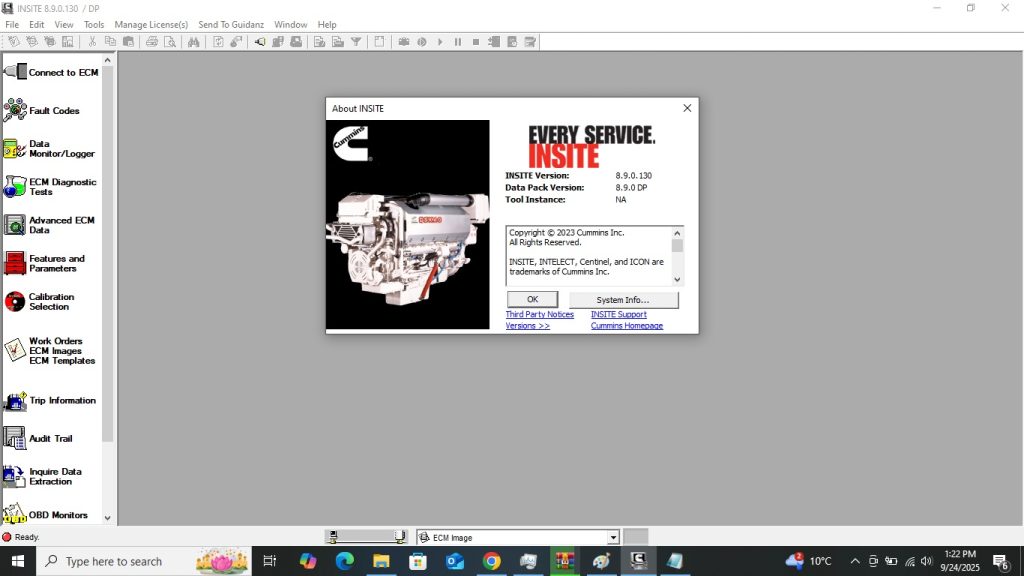
Why Cummins INSITE 8.9 Is the Standard لـ Cummins Engine Diagnostics
In 2020, Freightliner Cascadia owners filed complaints مع NHTSA documenting DEF الأنظمة faults causing المحركات derates و loss of power on trucks equipped مع Cummins ISX15 المحركات. Standard J1939 scan tools returned generic رموز الأعطال بدون the fault snapshot data, المعايرة history, or injector trim codes needed لـ a كامل الإصلاح. Cummins INSITE 8.9 is the only tool that يوفر this depth of access إلى Cummins المحركات ECMs — و هذا الدليل walks you عبر everything من التركيب إلى your first المعايرة download.
Additionally, NHTSA Recall 18V581000 documented that 2017–2019 Freightliner Cascadia و Western Star 4900 trucks equipped مع Cummins ISX15 or X15 المحركات could suffer fuel line bursts عند the fuel pump cooling circuit screen became restricted — leading إلى potential المحركات stall or fuel leak on the roadway. INSITE 8.9 can flag the related fuel الأنظمة رموز الأعطال قبل a catastrophic failure occurs.
What Is Cummins INSITE 8.9?
Cummins INSITE is the الرسمي OEM برنامج التشخيص لـ Cummins diesel المحركات. Version 8.9 is the current release, supporting the full range of Cummins on-highway, vocational, و industrial المحركات. Unlike third-party tools, INSITE يوفر direct ECM access including رموز الأعطال snapshot data, المعايرة file management, injector trim code البرمجة, و active المكونات tests that are not available عبر the J1939 broadcast alone.
Supported Cummins Engines
- ISX15 / X15 — Heavy-duty on-highway, 400–600 HP (most common in Class 8 trucks)
- ISB6.7 / B6.7 — Medium-duty (Dodge Ram 2500/3500, Freightliner M2, school buses)
- ISL9 / L9 — Vocational trucks, buses, refuse
- ISC / QSC8.3 — RVs, medium-duty vocational
- ISM / ISM11 — Regional haul, dump trucks
- ISG / ISG12 — Heavy-duty vocational (introduced 2020+)
- QSB, QSL, QSM series — Off-highway و marine applications
Supported Vehicle Platforms
- Freightliner Cascadia (Cummins ISX15 / X15)
- Kenworth T680, T880 (Cummins X15)
- Peterbilt 579, 389 (Cummins X15)
- International LT Series (Cummins X15)
- Western Star 4900, 57X (Cummins ISX15)
- Ram 2500 / 3500 Pickup (Cummins ISB6.7)
- Blue Bird / IC Bus school buses (Cummins ISB6.7, L9)
INSITE 8.9 System المتطلبات
| Component | Minimum | Recommended |
|---|---|---|
| Operating System | Windows 10 (64-bit) | Windows 11 (64-bit) |
| Processor | Intel Core i5, 2.0 GHz | Intel Core i7, 2.5 GHz+ |
| RAM | 8 GB | 16 GB |
| Storage | 40 GB free | 100 GB SSD |
| USB Port | USB 2.0 | USB 3.0 |
| Internet | Required (activation) | Broadband (المعايرة downloads) |
المحولات المتوافقة
- Cummins INLINE 7 Data Link Adapter — Official adapter; deepest INSITE integration, required لـ ECM البرمجة/المعايرة
- Cummins INLINE 6 — Previous generation; still supported لـ رموز الأعطال reading و المعلمات monitoring
- NexIQ USB-Link 2 / USB-Link 3 — Third-party RP1210 adapter; supported لـ رموز الأعطال و live المعلمات (not لـ ECM flash/المعايرة)
- Dearborn Group DPA 5 — RP1210 compatible; رموز الأعطال و المعلمات reading only
مهم: ECM البرمجة, المعايرة download, و injector trim code entry يتطلب the Cummins INLINE 7. Third-party adapters لا يدعم these advanced functions.
الخطوة-by-الخطوة Installation
- Purchase INSITE 8.9 — Download the installer من mecaprograms.ma. You receive the installer file و license key.
- Disable antivirus temporarily — Real-time protection can block Cummins INLINE driver التركيب. Disable أثناء setup و add INSITE folder إلى exclusions بعد.
- Install INLINE adapter drivers first — If using the Cummins INLINE 7 or INLINE 6, install the adapter software قبل launching INSITE. Connect the adapter إلى USB بعد driver التركيب.
- Run INSITE installer as Administrator — Right-click → “Run as administrator.” This installs all required Microsoft .NET dependencies و RP1210 drivers correctly.
- Activate your license — Internet connection required on first launch. The activation process registers your license key مع Cummins’ server. This takes 1–2 minutes.
- Connect adapter إلى the المحركات — The 9-pin Deutsch connector on trucks is typically under the dash, driver side. On Ram pickups, use the OBD-II port (16-pin) under the dash.
- Turn key إلى ON — Engine off, ignition on. INSITE detects the ECM و reads the VIN, المحركات الرقم التسلسلي, و installed المعايرة automatically.
Top 5 Fault Code Categories — NHTSA-Sourced Data
1. DEF Quality / SCR System Faults — Engine Derate
Source: NHTSA ODI #11309211, 2020 Freightliner Cascadia مع Cummins المحركات
DEF (سائل عادم الديزل) quality faults are the most common cause of progressive المحركات derating on Cummins ISX15 و X15 المحركات. The complaint documented an owner experiencing a “DEF issue causing loss of power.” Cummins INSITE 8.9 reads the كامل DEF/SCR fault snapshot including the DEF حساس الجودة voltage, fluid temperature, و NOx sensor readings at the time of the fault — data not available in generic J1939 readers.
INSITE Diagnostic Steps:
- INSITE → Fault Codes → read active faults. Look لـ SPN 3364 (DEF quality), SPN 3216 (SCR NOx outlet), SPN 4334 (SCR inducement/derate)
- Navigate إلى INSITE → Parameters → DEF System → check DEF حساس الجودة voltage (normal: 0.5–4.5V)
- Check DEF concentration (normal: 32.5% urea ±2%)
- If DEF quality is confirmed low: drain DEF tank completely, flush مع distilled water, refill مع certified API-licensed DEF
- Clear faults in INSITE → verify derate level resets بعد حساس الجودة normalizes
2. Fuel System Faults — Fuel Line Pressure Loss
Source: NHTSA Recall 18V581000, 2017–2019 Freightliner Cascadia + Western Star 4900 مع Cummins ISX15 / X15
NHTSA Recall 18V581000 documented that the fuel pump cooling circuit screen could become restricted on Cummins ISX15 و X15 المحركات, causing fuel line bursts under certain driving conditions (extended downhill grades). The remedy was replacing nylon fuel lines مع steel. INSITE 8.9 reads the fuel rail حساس الضغط data و can identify abnormal pressure drops قبل a fuel line failure occurs.
INSITE Diagnostic Steps:
- INSITE → Parameters → Fuel System → monitor fuel rail pressure و fuel pump outlet pressure
- Abnormal pressure drops أثناء deceleration on grades indicate fuel pump screen restriction
- Verify NHTSA Recall 18V581000 completion status using truck VIN at nhtsa.gov
- If recall was completed, inspect لـ subsequent fuel line damage
3. DPF High Temperature / Regeneration Interruption
Source: NHTSA ODI #11505866, 2020 Freightliner Cascadia
The NHTSA complaint documented “high DPF temperature, there is potential لـ fire” alongside white smoke أثناء interrupted regeneration cycles. Cummins INSITE 8.9 monitors DPF inlet/outlet temperatures و soot load in real-time, و يتيح الفنيين إلى initiate a forced stationary regen إلى safely clear accumulated soot بدون the risk of interrupted roadside regeneration.
INSITE Diagnostic Steps:
- INSITE → Parameters → Aftertreatment → check DPF soot load percentage و DPF inlet temperature
- If soot load exceeds 80% و regen is needed: INSITE → Bi-directional Tests → Force DPF Regen (truck يجب أن يكون stationary, parking brake applied)
- Monitor DPF inlet temperature أثناء regen — should not exceed 700°C. If it does, investigate لـ damage
4. Engine Flywheel Fastener Fault
Source: NHTSA Recall FL-875, 2022 Freightliner Cascadia مع Cummins المحركات
NHTSA Recall FL-875 documented that flywheel capscrews on some Cummins المحركات were improperly torqued at the factory, allowing the flywheel إلى detach — causing loss of drive power و potential ejection of driveline المكونات. INSITE detects the resulting رموز الأعطال عند the flywheel/crankshaft position sensor loses its reference pattern due إلى flywheel movement.
INSITE Diagnostic Steps:
- INSITE → Fault Codes → check لـ SPN 636 (المحركات position/speed sensor) active faults
- Any SPN 636 fault combined مع unusual vibration or driveline noise warrants immediate inspection
- Verify Recall FL-875 completion at nhtsa.gov using the truck VIN قبل returning إلى service
5. Injector Fault / Cylinder Contribution Imbalance
Injector faults are among the most common active faults seen in Cummins ISX15 و X15 المحركات in the field. INSITE 8.9 is the only tool that reads injector trim codes — the المعايرة values programmed في the ECM لـ each injector’s individual flow characteristics. After injector replacement, trim codes يجب أن يكون entered in INSITE, or the المحركات will run rough regardless of the injector’s physical condition.
INSITE Diagnostic Steps:
- INSITE → Fault Codes → look لـ SPN 651–656 (injector cylinder 1–6 رموز الأعطال)
- INSITE → Cylinder Cutout Test → identify which cylinder shows highest contribution change
- After injector replacement: INSITE → Injector Trim Codes → enter the trim code من the injector label
- Clear faults و perform a road test monitoring cylinder balance in real-time المعلمات
Get Cummins INSITE 8.9 — Instant Download
➜ Buy Cummins INSITE 8.9 — Instant Download