
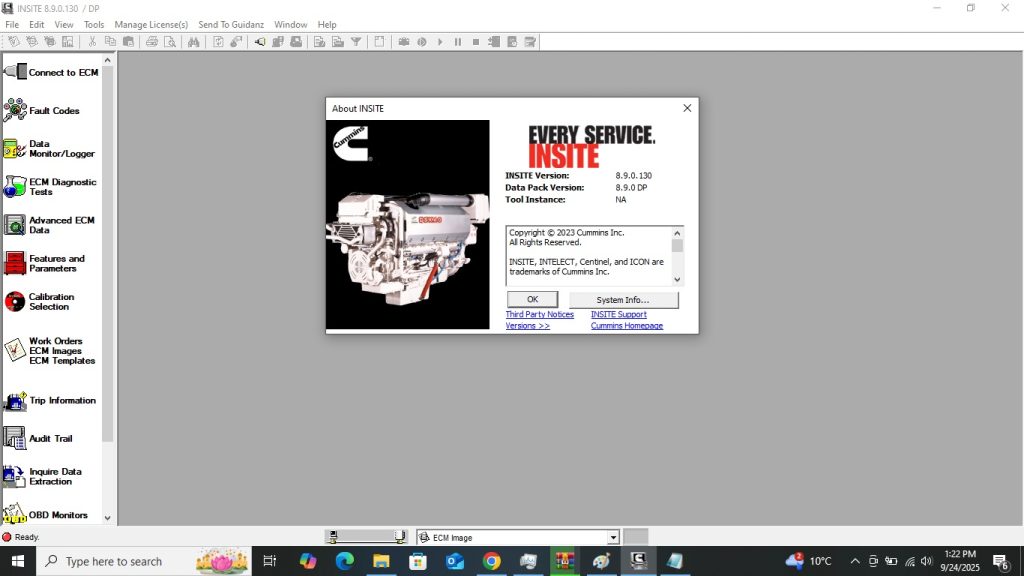
Cummins INSITE 8.9 is the الرسمي OEM diagnostic و البرمجة software لـ Cummins diesel المحركات. Found in heavy-duty trucks, buses, generators, marine applications, و agricultural equipment worldwide, Cummins المحركات are among the most common powerplants in المركبات التجارية — و INSITE is the only tool that يوفر كامل factory-level access. يغطي هذا الدليل التركيب, activation, compatible adapters, و how إلى get the most out of version 8.9.130 in a ورش العمل environment.
What Is Cummins INSITE?
INSITE is Cummins’ proprietary diagnostic و المعايرة software. It communicates مع Cummins ECMs over J1939 CAN using an RP1210-compatible interface, giving الفنيين access إلى functions no aftermarket scanner can replicate.
Key functions of INSITE 8.9
- Full رموز الأعطال diagnostics — active, inactive, و pending رموز الأعطال across المحركات, aftertreatment, و auxiliary الأنظمة
- Live data monitoring — real-time display of all المحركات sensor values including boost, EGR, SCR temperatures, و injection timing
- Injector trim codes — read و write individual injector المعايرة codes لـ fuel quantity correction
- Power correction factor — adjust rated power output لـ altitude و application requirements
- INCAL المعايرة updates — apply the latest Cummins المعايرة database updates إلى the ECM
- Aftertreatment management — force DPF regeneration, reset soot load, و perform SCR dosing الأنظمة diagnostics
- Parameter البرمجة — adjust idle speed, cruise control settings, progressive shift points, و PTO التهيئة
Version 8.9.130 adds يدعم لـ the latest X15 Efficiency Series و PACE المحركات, مع updated GHG17 و GHG21 aftertreatment diagnostic coverage و improved رموز الأعطال descriptions لـ 2022–2024 model year trucks.
Engine Coverage
| Engine Family | Application | INSITE 8.9 Support |
|---|---|---|
| ISX15 / X15 | Freightliner, Kenworth, Peterbilt, Volvo, Mack | ✅ Full |
| ISB6.7 / B6.7 | Ram 2500/3500, medium-duty trucks | ✅ Full |
| ISC8.3 / L9 | Buses, medium-duty, vocational | ✅ Full |
| QSB / QSL / QSM | Construction, marine, generator | ✅ Full |
| ISM / ISX11.9 | Legacy heavy-duty trucks | ✅ Legacy mode |
| X12 / B4.5 | Medium-duty, vocational | ✅ Full |
المحولات المتوافقة
INSITE يتطلب an RP1210-compatible interface إلى communicate مع Cummins ECMs. The following adapters are confirmed working مع version 8.9:
- Nexiq USB Link 3 — industry standard, يدعم J1939 و J1708 simultaneously. Best choice لـ North American fleets.
- Noregon DLA+ 3.0 — excellent reliability, used extensively in fleet الصيانة environments
- Dearborn DPA 5 — reliable alternative at lower cost, confirmed compatible مع INSITE 8.x
- VXDIAG VHDI Truck — budget-friendly option, works لـ diagnostics و most البرمجة functions
Connects via the truck’s 9-pin Deutsch diagnostic port. For المحركات in non-truck applications (generators, marine), a pigtail adapter إلى the ECM diagnostic connector may be required.
Installation Guide
System المتطلبات
- Windows 10 64-bit or Windows 11
- Intel Core i5, 8 GB RAM minimum
- 15 GB free disk space
- USB 3.0 port لـ adapter connection
الخطوة 1 — Install Adapter Drivers First
Before running the INSITE installer, install your RP1210 adapter’s drivers و confirm it appears in Windows Device Manager بدون warning flags. INSITE’s setup detects available RP1210 adapters أثناء التركيب و pre-configures the communication stack accordingly.
الخطوة 2 — Run INSITE Setup
Launch the installer as Administrator. Select Full Installation إلى يتضمن the INSITE application, the INCAL المعايرة database, و the رموز الأعطال description library. A partial install leaves out the المعايرة database, which disables ECM المعلمات البرمجة. Installation takes 15–25 minutes depending on disk speed.
الخطوة 3 — Activate INSITE
INSITE 8.9.130 uses a licence file activation الأنظمة. After التركيب, launch INSITE و enter your activation credentials عند prompted. The software will validate the licence against the local licence file. Keep a backup of your activation details — reinstallation يتطلب the same credentials.
الخطوة 4 — Connect و Diagnose
Connect your RP1210 adapter إلى the المحركات’s 9-pin Deutsch port. In INSITE, go إلى Connection Wizard, select your RP1210 interface, و click Connect. INSITE will identify the ECM و present the full diagnostic screen within a few seconds.
Common Issues و Fixes
INSITE Cannot Find ECM
Verify the adapter is connected إلى the correct 9-pin Deutsch port — not the 6-pin AUX port present on some trucks. Also confirm the adapter is selected correctly in INSITE’s Connection Wizard و that the ignition is in key-on position.
INCAL Calibration Update Fails
INCAL updates يتطلب a stable internet connection و sufficient disk space. Ensure Windows Defender ليس blocking the update process, و that your INSITE licence is current قبل attempting a المعايرة database update.
Injector Trim Code Write Fails
Injector code writing يتطلب the المحركات إلى be off و the ECM in a specific state. Ensure the ignition is key-on المحركات-off, not crank mode, و that no active رموز الأعطال are blocking البرمجة access.
For mixed fleets also running Detroit Diesel المحركات, our Detroit Diesel DDDL 8.19 SP1 guide covers the equivalent OEM tool لـ DD13/DD15/DD16 المحركات. For brand-agnostic coverage across multiple truck makes, see our JPRO 2025 v2 guide.
Get Cummins INSITE 8.9.130
Available as an instant digital download. Full التركيب مع INCAL المعايرة database — no activation headaches, no missing المكونات.