
What You Need Before Starting
- DaVinci DPF EGR DTC v1.0.28 installed على physical Windows PC
- An ECU reading tool: KTag, Kess V2, KT200, BDM100 or PCMFlash
- Vehicle مع ignition ON, المحركات OFF (لـ OBD reading) or ECU removed من المركبات (لـ bench reading)
- .NET Framework 4.7.2 installed
الخطوة 1 — Read the ECU Binary
Use your reading tool إلى extract the ECU binary file (.bin):
- KTag: Connect via BDM or boot mode on bench. Select ECU type, click Read, save .bin
- Kess V2: Connect via OBD or boot mode. Read ECU, save .bin file
- KT200: Select ECU protocol, read و save .bin
Always save a backup of the الأصلي file قبل any modification.
الخطوة 2 — Open File in DaVinci
- Run DaVinci_EGR_DPF_DTC.exe as Administrator
- Open your .bin file
- DaVinci auto-detects the ECU إصدارات — confirm it matches your ECU label
الخطوة 3 — Select Systems إلى Disable
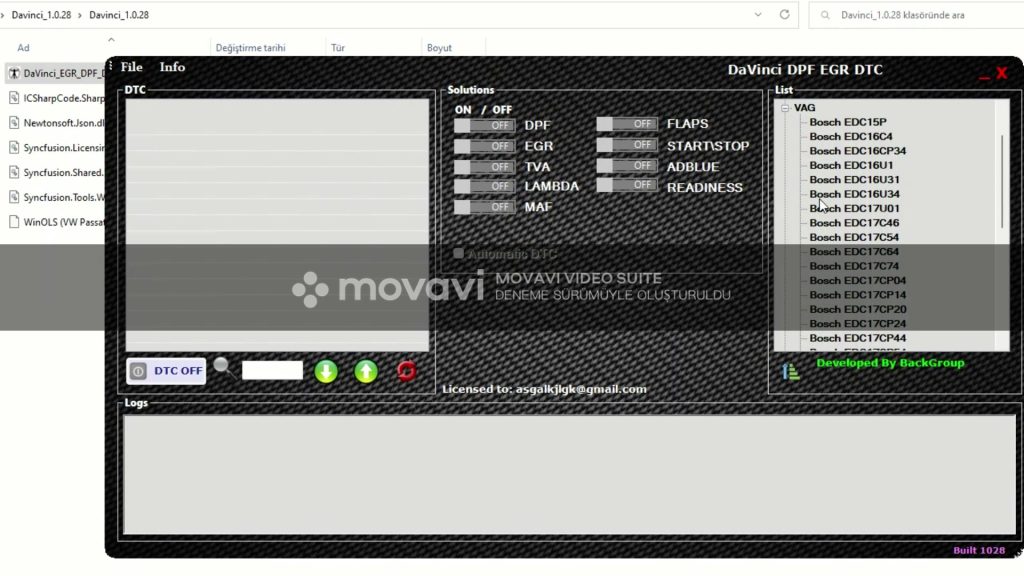
In the Solutions panel, toggle switches OFF لـ each الأنظمة:
- DPF OFF, EGR OFF, AdBlue OFF (if applicable)
- TVA, MAF, Lambda, Flaps — OFF as needed
The DTC panel shows all رموز الأعطال in the file. Click DTC OFF إلى clear them.
الخطوة 4 — Save the Modified File
Save the modified .bin. DaVinci confirms in the log: DPF/EAF deactivated مع success و EGR deactivated مع success.
الخطوة 5 — Write Back إلى ECU
Use your reading tool إلى flash the modified .bin back إلى the ECU. Verify the write completed قبل reconnecting the ECU إلى the المركبات. Use a battery charger throughout the process.