
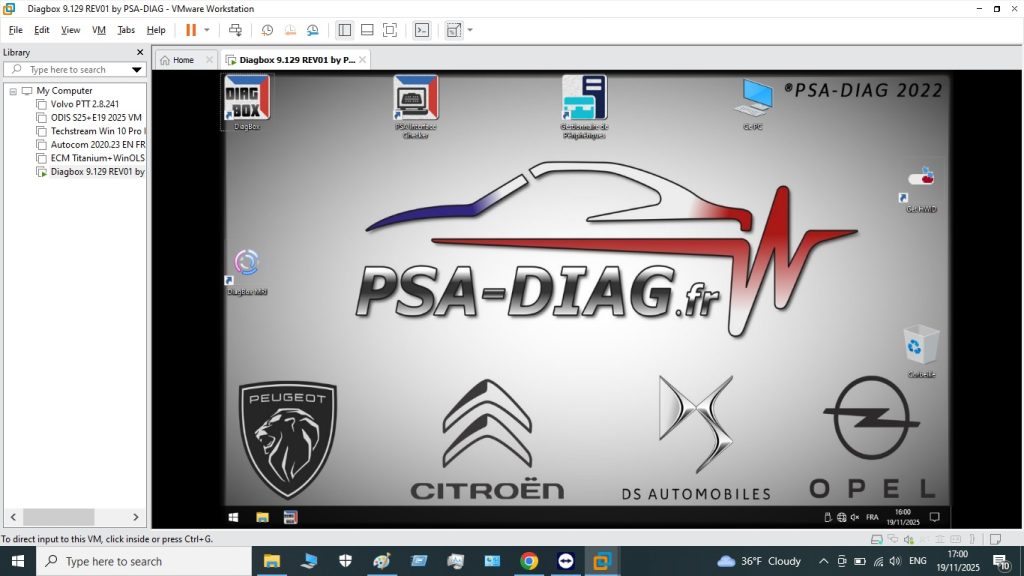
Diagbox is the برنامج التشخيص الرسمي من the PSA Group, covering Peugeot, Citroën, DS Automobiles, و Opel/Vauxhall المركبات sold in Europe من the mid-2000s عبر إلى current models. It replaced the older Lexia 3 / PP2000 platform و has been the dealer standard since around 2010. إذا كنت service French cars professionally, Diagbox 9.129 is the tool that gives you full OEM access — رموز الأعطال, actuator tests, ECU البرمجة, و manufacturer-specific service functions that no generic scanner can match — comparable in scope إلى what ODIS يوفر لـ Volkswagen Group المركبات.
What Vehicles Does Diagbox 9.129 Cover?
Diagbox 9.129 is one of the most comprehensive releases of the software و covers an extensive range:
- Peugeot: 107, 206, 207, 208, 2008, 301, 306, 307, 308, 3008, 407, 408, 5008, 508, 607, 807, Partner, Expert, Boxer
- Citroën: C1, C2, C3, C3 Aircross, C4, C4 Cactus, C4 Picasso, C5, C5 Aircross, C6, C8, Berlingo, Dispatch, Relay
- DS Automobiles: DS3, DS4, DS5, DS7, DS9
- Opel/Vauxhall: Crossland, Grandland, Mokka (PSA platform models)
Coverage extends إلى petrol, diesel, hybrid, و electric إصدارات. Version 9.129 adds updates لـ the latest e-208, e-2008, و DS3 E-Tense electric models.
Key Diagbox Functions
Diagnostics
Diagbox reads و clears رموز الأعطال across every ECU in the المركبات — not just المحركات و gearbox, but BSI (Body Systems Interface), airbag, climate, steering, parking sensors, lane assist, و every other module. Unlike generic OBD2 readers, it accesses manufacturer-specific (non-standard) رموز الأعطال that make up the majority of real-world diagnostic work on PSA المركبات.
Actuator Tests
Force individual المكونات إلى activate لـ testing: cooling fans, fuel injectors, EGR valve, glow plugs, electric throttle body, air conditioning compressor, و more. This is essential لـ confirming suspected failures بدون removing parts.
ECU Programming
Diagbox performs ECU و BSI reflashing, including المعلمات recoding بعد المكونات replacement. When replacing a BSI unit, the new module يجب أن يكون “married” إلى the المركبات’s other ECUs via Diagbox — no other tool can perform this function correctly on PSA platforms.
Service و Maintenance Functions
- Service indicator reset (mileage و time-based)
- Particle filter (DPF/FAP) إعادة التوليد القسري
- Brake caliper piston retraction (electric parking brake)
- Battery replacement registration
- Steering angle sensor reset
- Suspension height المعايرة (Citroën Hydractive)
System المتطلبات
- OS: Windows 7 32-bit or 64-bit (native); Windows 10/11 via VMware
- RAM: 4 GB minimum
- Storage: 30 GB free space (the المركبات database is large)
- Interface: Lexia 3 (الأصلي or compatible clone) or DiagBox VCI
VMware Installation Guide
Diagbox 9.129 is notoriously difficult إلى install on modern Windows 10/11 الأنظمة due إلى its dependency on 32-bit المكونات و specific DirectX/Visual C++ runtime versions that conflict مع current Windows builds. The VMware approach is strongly recommended و eliminates all of these compatibility issues.
الخطوة 1 — Install VMware Workstation Player
Install VMware Workstation Player 17 on your host المعدات. Enable Intel VT-x in your BIOS if it ليس already active (required لـ 64-bit virtual المعدات). Once installed, confirm VMware is running correctly by checking the application opens بدون errors.
الخطوة 2 — Extract the Diagbox VM Image
Extract the compressed VM archive إلى a local drive مع at least 40 GB free. Use a path بدون spaces — C:DiagboxVM is ideal. Navigate إلى the extracted folder و open the .vmx file in VMware Workstation Player. The المعدات will appear in your VM library.
الخطوة 3 — Configure VM Settings
Before starting the VM, edit its hardware التهيئة:
- Allocate 4096 MB RAM minimum
- Set CPU إلى 2 cores
- Confirm USB 2.0 controller is enabled (Lexia 3 uses USB 2.0)
- Set network adapter إلى Bridged mode
الخطوة 4 — Start the VM و Connect Your Lexia Interface
Power on the VM. Once Windows loads, connect your Lexia 3 interface via USB. In VMware, go إلى VM → Removable Devices و connect the Lexia device إلى the virtual المعدات. Open Device Manager inside the VM و confirm the Lexia interface is recognised بدون driver errors.
الخطوة 5 — Launch Diagbox و Select Vehicle
Open Diagbox من the desktop. On the home screen, click Diagnosis و select your المركبات manufacturer. Connect the Lexia interface إلى the المركبات’s OBD2 port (under the dashboard, driver’s side on most PSA models) و turn the ignition إلى position II (accessory, المحركات off). Diagbox will connect و identify the المركبات automatically using the VIN.
Common Issues و Solutions
Lexia Not Detected in Windows
If the Lexia interface لا appear in Device Manager, the driver ليس installed. In the VMware image, the Lexia driver is pre-installed. إذا كنت are doing a native install, run the driver installer من the Diagbox التركيب directory under driverslexia.
“Connection إلى Vehicle Failed”
Usually caused by a weak OBD2 cable connection or the ignition not being in position II. On older PSA models (pre-2005), Diagbox يتطلب a separate “PP2000” mode لـ certain الأنظمة — check the المركبات type selector in the Diagbox connection wizard.
DPF Regeneration Not Available
DPF/FAP إعادة التوليد القسري يتطلب the المحركات إلى be at operating temperature و the particle filter saturation level إلى be above a minimum threshold. Diagbox will show the current DPF load level under the المحركات ECU live data قبل allowing the regeneration cycle إلى start.
Get Diagbox 9.129 — VMware Ready
Our Diagbox 9.129 VMware image is pre-installed مع the full المركبات database و Lexia drivers configured. Skip the التركيب complexity entirely — download, extract, و start تشخيص PSA المركبات immediately.
If your ورش العمل also services Toyota or Lexus المركبات, our Toyota Techstream V18 التركيب guide covers the equivalent factory-level OEM tool لـ Japanese المركبات — also available as a pre-configured VMware image مع the same straightforward setup.