
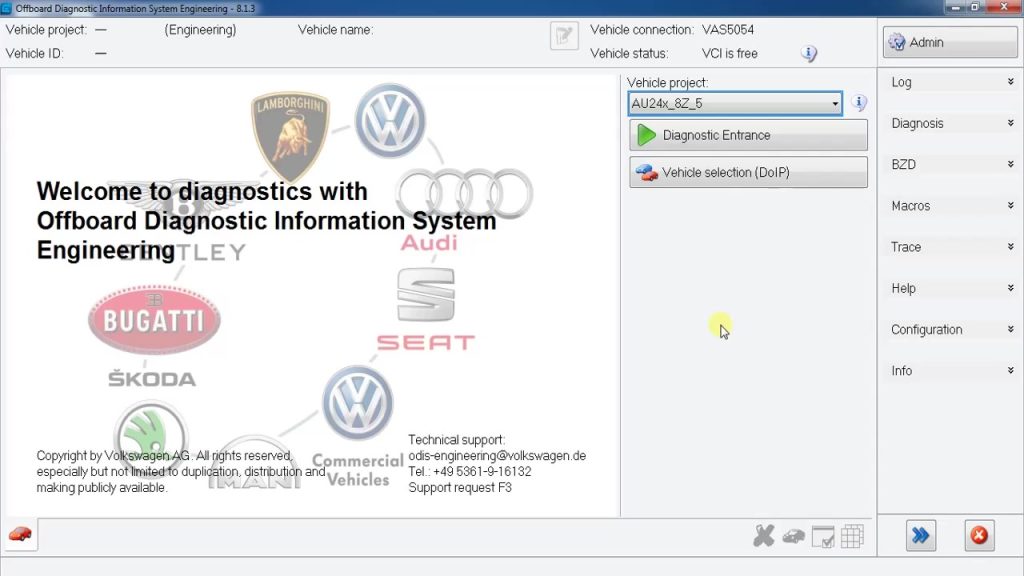
Offboard Diagnostic Information System Engineering 9.1.0 (ODIS Engineering) is the industry‑standard software لـ deep ECU البرمجة, diagnostics, و coding on VW Group المركبات. This tutorial walks احترافي truck و car الفنيين عبر selecting a المركبات project, accessing the diagnostic entrance, identifying control modules, flashing an ECU, و clearing DTC memory, all while highlighting the critical power‑supply warning.
What You Will Learn
- كيفية create و select a المركبات project in ODIS Engineering 9.1.0
- كيفية open the diagnostic entrance و navigate the وحدة التحكم list
- Methods لـ accurately identifying the target ECU among multiple modules
- الخطوة‑by‑step ECU flashing procedure, including software update upload
- كيفية clear stored diagnostic trouble codes بعد flashing
- Best practices لـ maintaining a stable power supply أثناء البرمجة
- كيفية troubleshoot common flashing warnings و errors
الخطوة-by-الخطوة Walkthrough
Start by launching ODIS Engineering 9.1.0 على compatible Windows workstation. From the main screen, click the Project icon و choose Create New Project. Enter the VIN or select the المركبات family (e.g., VN35X, Audi, Volkswagen) و confirm. The software will load the appropriate وحدة التحكم database لـ the selected model.
Once the project is created, navigate إلى the Diagnostic Entrance tab. Here you will see a list of all available communication interfaces (e.g., K‑Line, CAN, Ethernet). Choose the interface that matches your hardware adapter و click Connect. A successful connection is indicated by a green status light.
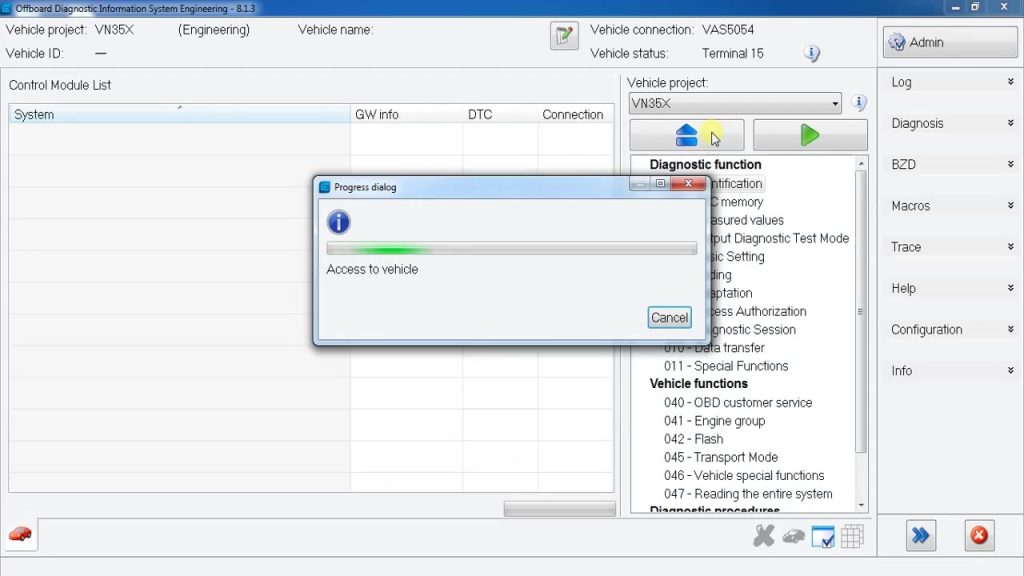
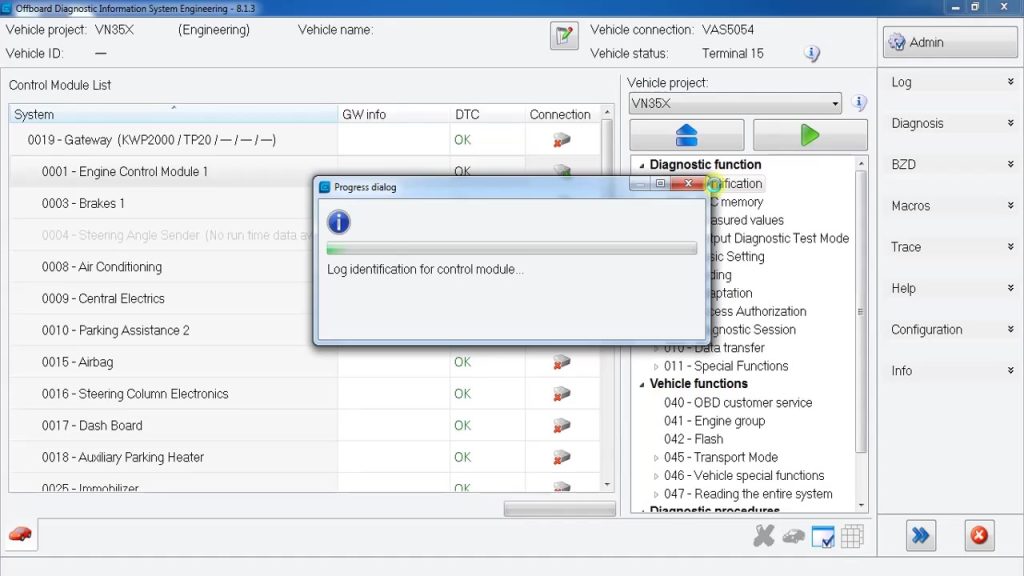
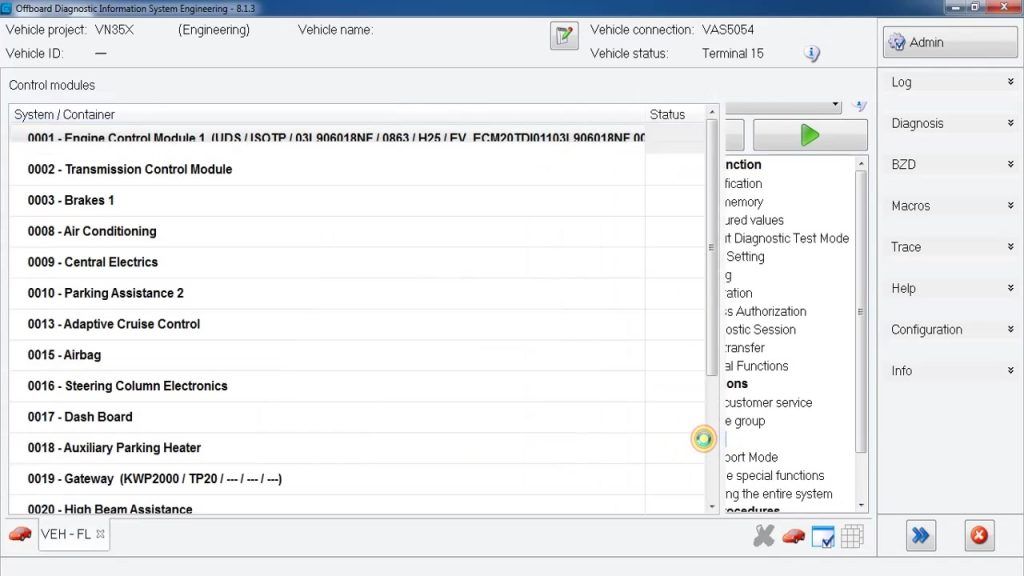
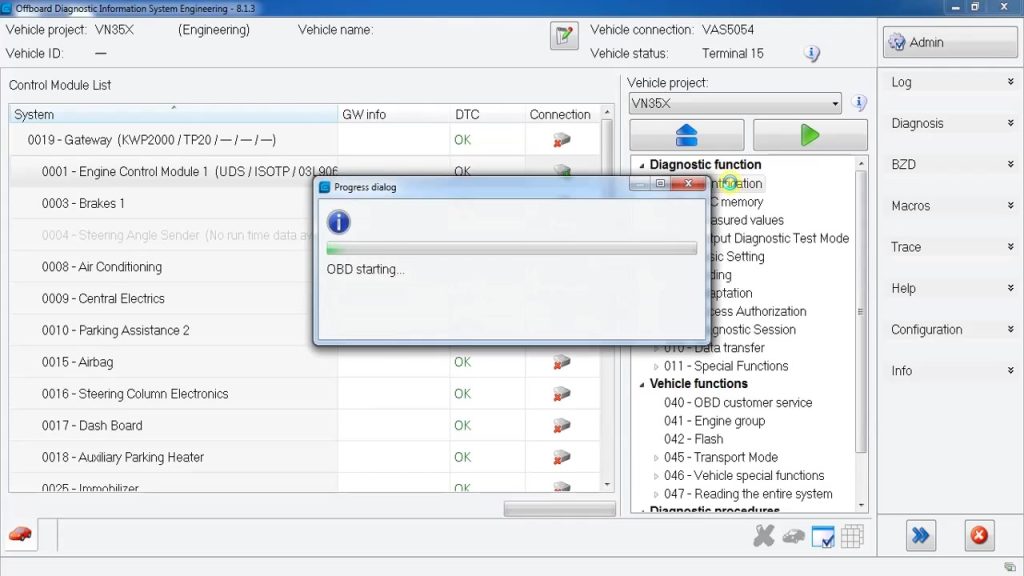
After establishing communication, open the Control Module List. ODIS Engineering automatically populates the list مع every ECU detected on the المركبات’s network. Use the filter box إلى narrow the view إلى the specific module you intend إلى flash, مثل the Engine Control Unit (ECU) or Transmission Control Module (TCM). Highlight the target module و press Identify إلى retrieve detailed information, including part number, software version, و hardware revision. This step confirms you are addressing the correct unit قبل any البرمجة begins.
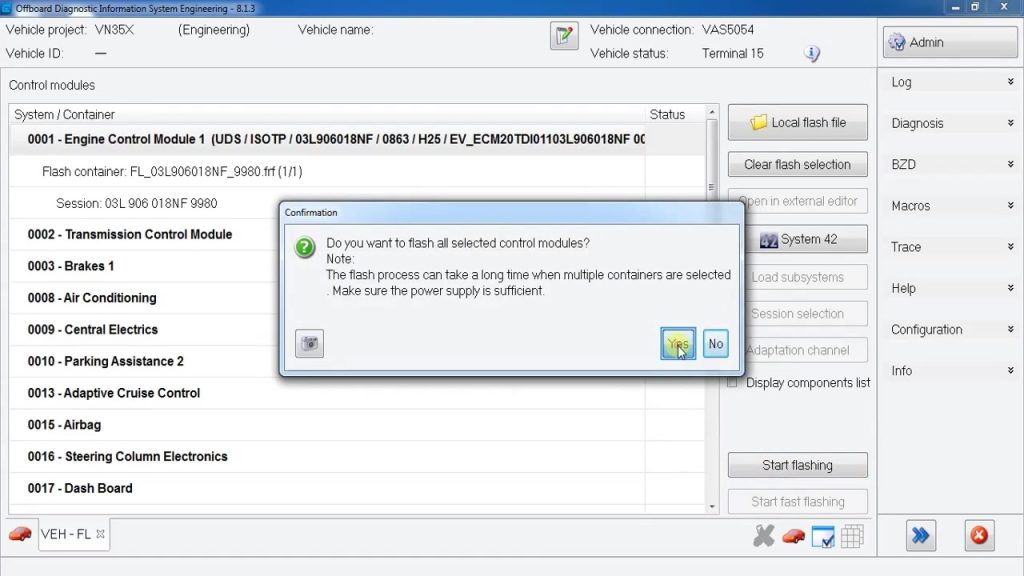
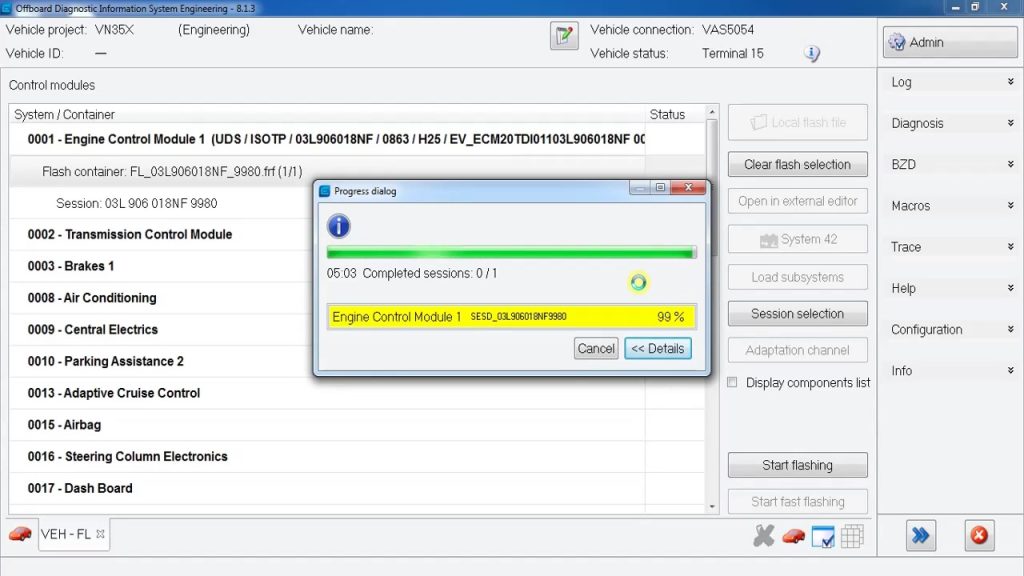
To begin the flash, select the identified ECU و click the Flash button. The software will prompt you إلى load the appropriate المعايرة file (e.g., VW_ECU_2024_01.bin). Browse إلى the file location, select it, و confirm. ODIS Engineering then displays a warning: “Ensure a stable power supply أثناء flashing; loss of power may brick the ECU.” Connect a dedicated 12 V battery charger or a high‑capacity power pack إلى the المركبات’s battery terminals, و verify the charger’s output is within the manufacturer’s recommended range. Once the power source is secured, click Start Flash. The progress bar shows real‑time data transfer, checksum verification, و write cycles.
During flashing, avoid any operation that could interrupt the power flow—no turning off ignition, no disconnecting the diagnostic cable, و no opening doors that might trigger a voltage drop. If the software detects a power anomaly, it will automatically pause و display an رموز الأخطاء. In that case, re‑establish a stable supply و resume the process من the last successful block. After the flash completes, ODIS Engineering prompts you إلى reset the ECU. Accept the reset, then يتيح the المركبات إلى idle لـ a few minutes while the new software initializes.
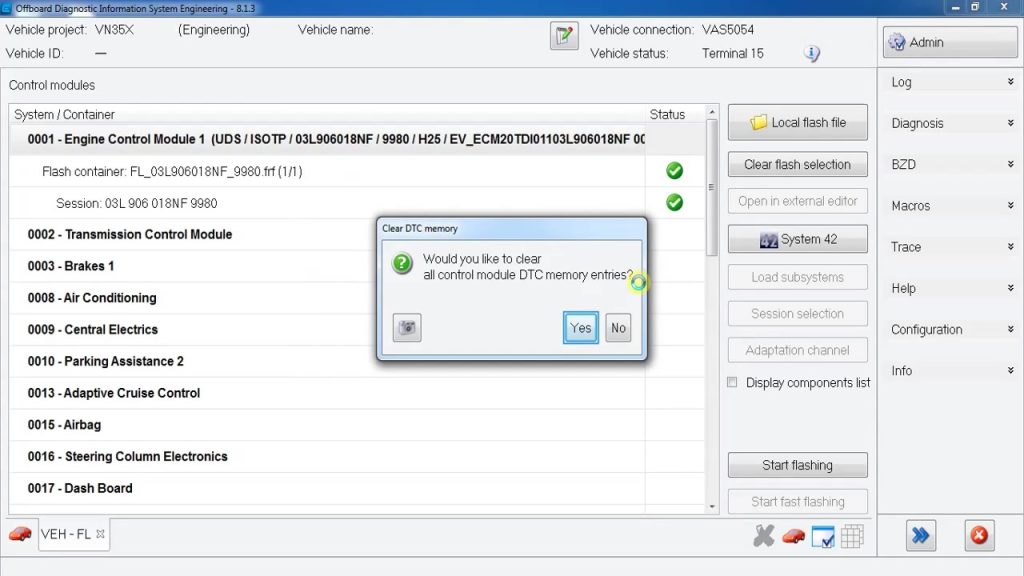
With the new software running, proceed إلى clear any stored diagnostic trouble codes. Return إلى the Control Module List, select the freshly flashed ECU, و click Clear DTCs. Confirm the action, و ODIS Engineering will erase the memory of previous faults, ensuring a clean slate لـ future diagnostics. A final verification scan confirms that no active codes remain.
To document the work, generate a service report. Click Report → Create PDF. The report يتضمن project details, ECU identification, flash file version, power‑supply confirmation, و DTC clearance status. Save the PDF إلى your ورش العمل’s server لـ audit purposes.
Finally, disconnect the diagnostic interface, remove any auxiliary power equipment, و perform a brief road test إلى validate the update under real‑world conditions. Monitor لـ any abnormal behavior; if issues arise, re‑run a diagnostic scan إلى capture new codes.
الميزات الرئيسية of Offboard Diagnostic Information System Engineering 9.1.0
- Comprehensive المركبات project management مع VIN‑based database loading
- Multi‑protocol diagnostic entrance supporting K‑Line, CAN, Ethernet, و FlexRay
- Dynamic وحدة التحكم list مع real‑time identification و version reporting
- Robust ECU flashing المحركات مع checksum verification و rollback protection
- Integrated DTC memory clearing و live data streaming لـ post‑flash validation
- Automated service report generation مع customizable templates
Compatible Vehicles و ECUs
ODIS Engineering 9.1.0 يدعم a wide range of VW Group platforms, including but not limited إلى:
- Volkswagen Golf, Passat, Tiguan, و commercial VN35X series
- Audi A3, A4, Q5, و high‑performance models
- Seat Leon, Ateca, و Ibiza
- Skoda Octavia, Superb, و Kodiaq
- Luxury و hyper‑car applications مثل Lamborghini Huracán, Bugatti Chiron, و select VW Group prototypes
- All related ECUs: المحركات, transmission, ABS, airbag, body control, infotainment, و gateway modules
Pro Tips
- Always verify battery voltage is above 12.5 V قبل starting a flash; a low‑state battery can cause incomplete writes.
- Use a dedicated power supply مع at least 5 A current rating لـ high‑capacity ECUs like the المحركات وحدة التحكم.
- Keep a backup copy of the الأصلي المعايرة file على secure USB drive; ODIS Engineering يتيح you إلى restore it if the new flash fails.
- After flashing, run a full الأنظمة scan (including all secondary modules) إلى catch any hidden faults introduced by the update.
- Document the exact software version و checksum displayed in ODIS Engineering; this information is essential لـ warranty claims و future استكشاف الأخطاء وإصلاحها.
Following this structured approach مع ODIS Engineering 9.1.0 ensures reliable ECU updates, clean diagnostic records, و minimal downtime لـ VW Group المركبات.
الأسئلة الشائعة
What precautions يجب أن يكون taken أثناء ECU flashing?
The flash process can take a long time, so ensure the power supply is sufficient إلى avoid interruptions.
Ready إلى use Offboard Diagnostic Information System Engineering 9.1.0 in your ورش العمل? Download it directly من mecaprograms.ma — instant delivery, no subscription needed.