
Why Fleet Mechanics Trust JPRO 2025 v2
In 2020, Kenworth T680 owners filed الرسمي complaints مع NHTSA documenting SPN 639 — communication loss بين the المحركات وحدة التحكم و the SAE J1939 data link. The truck logged this fault repeatedly, yet standard OBD-II scanners returned nothing actionable. Dealerships were unable إلى replicate the failure أثناء diagnostic sessions. JPRO 2025 v2 was engineered لـ exactly this scenario: deep J1939 و J1708 access across all major North American heavy-duty platforms, بدون relying on individual OEM subscriptions.
يغطي هذا الدليل everything you need: الأنظمة requirements, adapter selection, التركيب steps, و the five most common رموز الأعطال categories documented in NHTSA’s complaint database لـ Freightliner و Kenworth trucks.
What Is JPRO 2025 v2?
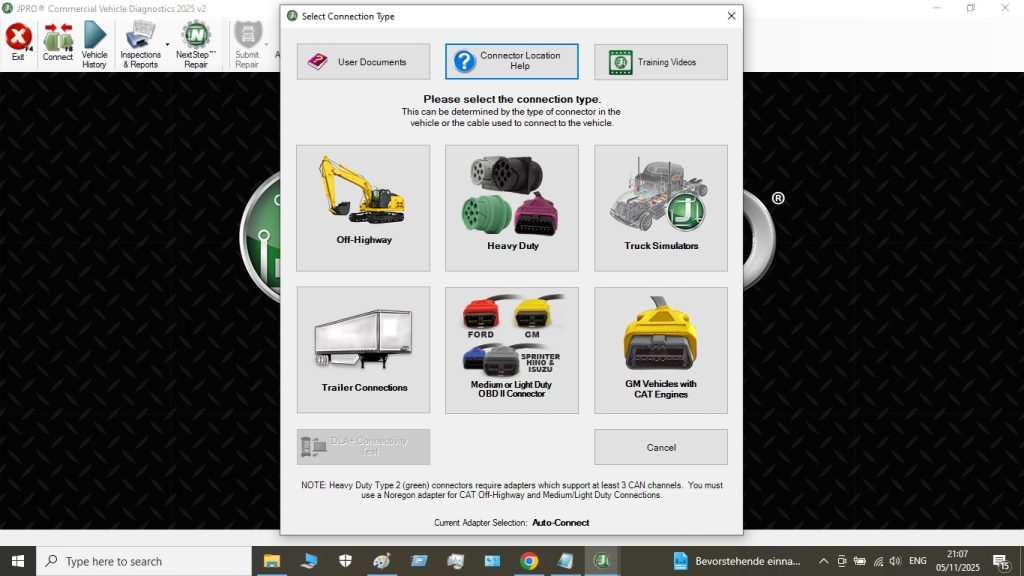
JPRO 2025 v2 is the latest version of Noregon Systems’ heavy-duty commercial المركبات برنامج التشخيص. It is the industry standard لـ independent fleet shops, owner-operators, و roadside service الفنيين who need إلى work across multiple truck brands بدون buying a separate OEM tool لـ each manufacturer.
JPRO communicates via the SAE J1939 و J1708 protocols — the same communication architecture used by every commercial truck ECU in North America. It reads و clears رموز الأعطال, monitors live المعلمات, runs bi-directional المكونات tests, و generates fleet reports.
Supported Vehicle Makes
- Freightliner — Cascadia, Columbia, M2 (all generations 2012–2025)
- Kenworth — T680, T880, W900, T660, T270
- Peterbilt — 579, 389, 567, 348, 337
- International / Navistar — LT Series, RH Series, HV Series, HX Series
- Volvo Trucks — VNL, VNR, VNX, VHD
- Mack — Anthem, Pinnacle, Granite, LR
- Western Star — 4900, 5700XE, 57X
Supported Engines
- Detroit Diesel DD13, DD15, DD16
- Cummins ISX15, X15, ISB6.7, X12
- PACCAR MX-13, MX-11
- Navistar A26, N13, A6.7
- Volvo D13, D11, D16
- Mack MP8, MP7, MP10
System المتطلبات
| Component | Minimum | Recommended |
|---|---|---|
| Operating System | Windows 10 (64-bit) | Windows 11 (64-bit) |
| Processor | Intel Core i5, 2.0 GHz | Intel Core i7, 2.5 GHz+ |
| RAM | 8 GB | 16 GB |
| Storage | 50 GB free HDD | 100 GB SSD |
| USB Port | USB 2.0 | USB 3.0 |
| Internet | Required لـ activation | Broadband لـ updates |
المحولات المتوافقة
JPRO 2025 v2 يتطلب an RP1210-compliant adapter. Generic ELM327 Bluetooth dongles are not compatible.
- NexIQ USB-Link 2 — Most widely used; يدعم J1939, J1708, CAN
- NexIQ USB-Link 3 — USB 3.0 + Bluetooth connectivity
- Noregon DLA+ 2.0 — Deepest integration مع JPRO
- Dearborn Group DPA 5 — Compatible لـ J1939/J1708
See our full JPRO 2025 v2 System المتطلبات & Adapters Guide.
الخطوة-by-الخطوة Installation
- Purchase و download — Get JPRO 2025 v2 من mecaprograms.ma. You receive the installer و license key by email.
- Disable antivirus temporarily — Windows Defender can block RP1210 driver التركيب. Disable أثناء setup و add JPRO folder إلى exclusions afterward.
- Run as Administrator — Right-click installer → “Run as administrator.”
- Install adapter drivers first — Install NexIQ RP1210 drivers قبل launching JPRO. Plug the adapter in قبل running the driver installer.
- Launch JPRO و activate — Internet required on first launch. Enter license key عند prompted.
- Connect adapter إلى the truck — 9-pin Deutsch connector is under the dash, driver side, on most Freightliner و Kenworth models.
- Select المركبات و begin session — JPRO auto-detects all ECUs broadcasting on J1939. Wait لـ the full ECU list قبل requesting faults.
Top 5 Fault Code Categories — NHTSA-Sourced Data
1. SPN 639 — J1939 Network Communication Loss
Source: NHTSA Complaint Database, 2020 Kenworth T680
Multiple T680 owners documented SPN 639 appearing in the ECM بدون any visible dashboard warning. Generic scan tools return no data because they depend on J1939 إلى communicate — JPRO’s dedicated J1939 Network Monitor identifies which ECU node dropped off the backbone.
Fix: Check J1939 backbone termination resistors (120Ω at each end of network). Inspect ضفيرة الأسلاك at cab/chassis connector. Verify all ECU nodes reappear بعد الإصلاح.
2. SPN 520247 FMI 31 — ABS System Internal Fault
Source: NHTSA Complaint, 2020 Freightliner Cascadia — linked إلى Recall FL-830
Manufacturer-specific SPN indicating ABS ECU internal failure condition. NHTSA Recall FL-830 documents the ABS ECU failing إلى detect a solenoid valve malfunction — requiring module reprogramming. JPRO’s bi-directional ABS test activates individual solenoids إلى pinpoint the fault قبل committing إلى module replacement.
Fix: Run JPRO bi-directional ABS solenoid test. If solenoid fails إلى respond, check wiring first. If wiring is intact, reprogram ABS/ESC module per FL-830 procedure.
3. SPN 1810 — Electronic Stability Control Malfunction
Source: NHTSA Complaint Database, 2020 Freightliner Cascadia
NHTSA complaints link SPN 1810 إلى unexpected brake activation events on the Cascadia platform. JPRO’s ESC المعلمات monitor captures wheel speed sensor data و ESC activation triggers in real-time.
Fix: Monitor all four wheel speed sensors in JPRO live المعلمات. A dropout on any sensor أثناء driving triggers ESC intervention. Inspect affected wheel speed ring و sensor air gap.
4. Powertrain Controller Fault — Gear Display Shows “N”
Source: NHTSA Recall FL-808, Freightliner Cascadia
Gear display shows “N” (neutral) despite the transmission being in gear. Root cause: powertrain controller البرمجة error. JPRO’s المعلمات view shows actual gear vs. displayed gear in real-time, confirming the discrepancy instantly.
Fix: Reprogram the powertrain controller. Verify FL-808 recall completion using the truck VIN at nhtsa.gov.
5. Forward Collision Avoidance / Radar Sensor Faults
Source: NHTSA — 11 complaints on 2019 Cascadia, 5 complaints on 2022 Cascadia
Most reported issue across the Cascadia platform 2019–2022: false AEB activation مع no obstacle present. JPRO reads the collision avoidance ECU’s stored fault history و live radar signal quality إلى differentiate a المعايرة issue من hardware failure.
Fix: Pull faults من the collision avoidance ECU in JPRO. Check لـ software TSBs. Inspect radar mounting alignment — even a small angle deviation causes false positives.
Get JPRO 2025 v2 — Instant Download
➜ Buy JPRO 2025 v2 — Instant Download