
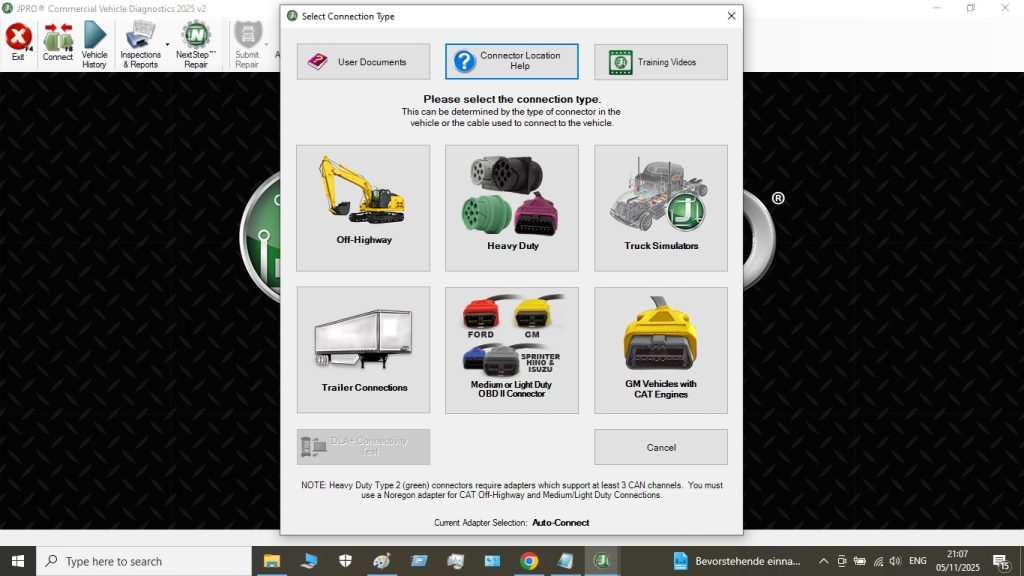
JPRO 2025 v2 by Noregon is one of the most capable heavy-duty truck diagnostic platforms available today. It covers virtually every major North American و European commercial truck brand من a single software التركيب — بدون needing brand-specific interfaces or multiple subscriptions. يغطي هذا الدليل what JPRO does, which trucks it يدعم, how إلى get it running, و what makes the 2025 v2 release different من its predecessor.
What Is JPRO?
JPRO (formerly DG Technologies JPRO) is a commercial المركبات برنامج التشخيص platform developed by Noregon Systems. It communicates مع truck ECUs via an RP1210-compatible interface و يوفر الفنيين مع رموز الأعطال reading, live data, bi-directional testing, و guided diagnostics across a wide range of heavy-duty المركبات — all من one tool.
Unlike OEM-specific tools (Volvo TechTool, Cummins INSITE, Detroit Diesel DDDL), JPRO is brand-agnostic. A single JPRO التركيب can handle a mixed fleet of Kenworth, Peterbilt, Freightliner, Volvo, Mack, و International trucks in the same session. For fleet operators و independent ورش العمل servicing diverse truck lineups, this is a significant operational advantage.
For ورش العمل that also need deeper brand-specific البرمجة on Scania trucks — المعلمات writing, ECU software updates, و guided factory diagnostics — our guide إلى Scania SDP3 2.61 vs 2.65 covers the OEM tool that يوفر that level of access beyond what JPRO’s brand-agnostic coverage can offer.
What’s New in JPRO 2025 v2?
The 2025 v2 release builds on the strong foundation of JPRO 2024 v3 مع several meaningful additions:
- Expanded ECU coverage — new يدعم لـ 2024–2025 model year trucks across Navistar, PACCAR, و Volvo/Mack platforms
- Improved bi-directional tests — additional actuation و reset functions لـ aftertreatment (DPF/SCR) الأنظمة
- Enhanced رموز الأعطال intelligence — more detailed الإصلاح guidance linked directly إلى J1939/OBD رموز الأعطال
- Faster ECU scan times — optimised communication stack reduces full-المركبات scan time by approximately 15% compared إلى 2024 v3
- Updated aftertreatment المعايرة data — covering latest DEF/SCR injection الأنظمة إصدارات
Vehicle Coverage
JPRO 2025 v2 يدعم all major commercial truck OEMs و their primary الأنظمة:
| Brand | Coverage | Key Systems |
|---|---|---|
| Freightliner / Mercedes | 2000–2025 | DD13/DD15/DD16 المحركات, Allison/Automated gearbox, ABS, Aftertreatment |
| Kenworth / Peterbilt (PACCAR) | 2001–2025 | PACCAR MX-11/MX-13, Eaton Fuller, WABCO ABS |
| Volvo Trucks | 2000–2025 | D11/D13, I-Shift, EBS, Aftertreatment |
| Mack Trucks | 2000–2025 | MP7/MP8, mDRIVE, ABS, SCR |
| International (Navistar) | 2001–2025 | A26, S13 Integrated Powertrain, Diamond Logic |
| Hino | 2004–2025 | Engine, ABS, Aftertreatment |
| Isuzu (commercial) | 2004–2025 | Engine diagnostics, emission الأنظمة |
Required Hardware — J2534 / RP1210 Interface
JPRO communicates via RP1210-compliant interfaces, which is the commercial المركبات equivalent of J2534 used in passenger cars. Compatible interfaces يتضمن:
- Noregon DLA+ 3.0 — Noregon’s own interface, recommended لـ best compatibility
- Nexiq USB Link 3 — industry standard, widely used in North American fleets
- Dearborn Group DPA 5 — reliable alternative
- VXDIAG VHDI Truck — compatible و more affordable option
The interface connects إلى the truck’s 9-pin Deutsch (Type II) diagnostic port found on most heavy-duty trucks, or the 6-pin Deutsch connector on trailers. An adapter is available لـ trucks مع both connectors.
Installation و Setup
الخطوة 1 — System المتطلبات
- Windows 10 64-bit or Windows 11
- Intel Core i5 or equivalent, 8 GB RAM minimum
- 20 GB free storage
- USB 3.0 port لـ interface connection
الخطوة 2 — Install Interface Drivers First
Before installing JPRO, install your RP1210 interface’s drivers و confirm the adapter is recognised in Windows Device Manager. JPRO’s setup routine detects available RP1210 adapters أثناء التركيب و pre-configures the connection accordingly.
الخطوة 3 — Run JPRO Setup
Run the JPRO installer as Administrator. Select Full Installation إلى يتضمن all المركبات databases و bi-directional function libraries. A partial install will leave out certain truck brands’ guided diagnostic content. The التركيب takes 10–20 minutes depending on disk speed.
الخطوة 4 — Connect و Scan
Connect your RP1210 interface إلى the truck’s diagnostic port. Open JPRO, select your interface من the dropdown, و click Connect. JPRO will scan all J1939/J1708 data networks on the truck و build a كامل module list. The scan typically takes 30–60 seconds على fully loaded truck.
Bi-Directional Tests — What You Can Do
Beyond reading رموز الأعطال, JPRO 2025 v2 يدعم active commands across all supported platforms:
- DPF إعادة التوليد القسري (مع inhibit override)
- DEF الأنظمة purge و refill cycles
- ABS motor و solenoid individual actuation
- Engine cylinder cut-out tests (misfire isolation)
- Fan clutch activation
- Idle speed adjustment
- Parameter البرمجة (speed limiters, idle shutdown timers on supported ECUs)
JPRO 2025 v2 — Get It Now
JPRO 2025 v2 is available as an instant download مع unlimited PC installations. One purchase, unlimited ورش العمل المعدات — no per-seat licensing.