
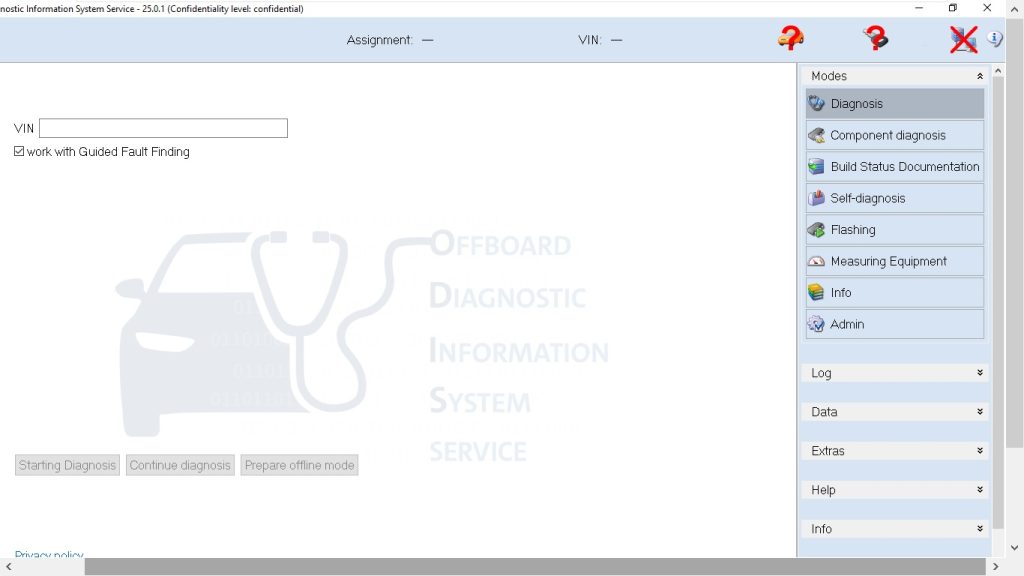
ODIS Service 25 is the برنامج التشخيص الرسمي للوكيل لـ the entire Volkswagen Group. إذا كنت work on VW, Audi, Seat, Skoda, Cupra, Porsche, Lamborghini, or Bentley المركبات, ODIS is the only tool مع full OEM-level access إلى every module, function, و المعايرة routine.
What Is ODIS Service?
ODIS (Offboard Diagnostic Information System) Service is the Volkswagen Group’s الرسمي ورش العمل منصة التشخيص. It replaced the older VAS-PC الأنظمة و is now standard at all VAG dealerships worldwide. Every authorized VW, Audi, Seat, و Skoda ورش العمل uses ODIS Service لـ fault تشخيص, module coding, adaptations, و guided الإصلاح procedures.
ODIS Service 25 vs ODIS Engineering 19 — Key Differences
- ODIS Service 25 — the ورش العمل tool. Reads/clears رموز الأعطال, runs guided fault-finding (GFF), performs module coding, long adaptations, basic settings, و flashing. Used daily in VAG dealerships.
- ODIS Engineering 19 — the development/المعايرة tool. Provides raw ECU المعلمات access, advanced measurement blocks, hex data editing, و engineering-level functions not available in ODIS Service. Used by VAG engineers و tuners.
The VMware package يتضمن both — giving you كامل VAG diagnostic و engineering capability in a single pre-configured virtual المعدات.
Vehicle Coverage
- Volkswagen: Golf, Polo, Passat, Tiguan, Touareg, Transporter, Amarok, ID.3, ID.4, ID.5
- Audi: A1–A8, Q2–Q8, TT, R8, e-tron series
- Seat / Cupra: Ibiza, Leon, Ateca, Formentor, Born
- Skoda: Fabia, Octavia, Superb, Kodiaq, Enyaq
- Porsche: 911, Cayenne, Macan, Panamera, Taycan (via PIWIS/ODIS overlap)
- Lamborghini & Bentley: Selected models via ODIS interface
- Model year coverage: 2000 إلى current production
ODIS Service 25 Key Functions
- Fault code reading و clearing (all modules)
- تحديد الأعطال الموجّه (GFF) — step-by-step dealer diagnostic procedures
- Module coding (short coding و long coding)
- Adaptations و basic settings
- ECU software flashing و updates
- Immobilizer (IMMO) البرمجة و key adaptation
- Throttle body, steering angle, و service interval resets
- DSG/DQ transmission adaptation resets
- Injector coding (diesel المحركات)
- DPF regeneration و reset
Why Use the VMware Version?
The standard ODIS التركيب is complex — it يتطلب specific Windows versions, a valid VW Group dealer license server connection, و a compatible VAS interface. The VMware pre-installed version eliminates all of this:
- No license server required — runs fully offline
- Pre-configured — no التركيب needed
- Works on Windows 10 و Windows 11
- Both ODIS Service 25 و Engineering 19 included
- Compatible مع VAS 5054A, VAS 6154, و J2534 adapters
System المتطلبات
- OS: Windows 10 or Windows 11 (64-bit)
- RAM: 8GB minimum, 16GB recommended
- Storage: 80–120GB free disk space (SSD strongly recommended)
- CPU: Intel Core i5 6th gen+ or AMD Ryzen 5, مع virtualization enabled
- VMware: VMware Workstation Player 17+ (free)
- Interface: VAS 5054A, VAS 6154, or ODIS-compatible J2534 adapter
Get ODIS Service 25 + Engineering 19 VMware →
More ODIS Service 25 + Engineering 19 VMware Guides
- ODIS Service 25 vs VCDS vs OBDeleven: Best VAG Diagnostic Tool?
- ODIS Service 25 System المتطلبات: PC, OS, Interface, و VMware Specs
- ODIS Service 25 Fault Codes: Common VAG DTCs و كيفية Fix Them
- ODIS Service سجل الإصدارات: From ODIS 3 إلى ODIS 25 — ما الذي تغيّر؟?
- كيفية Set Up ODIS Service 25 in VMware on Windows 10 و 11
- ODIS Service 25 لـ Beginners: First Diagnostic Session على VAG Vehicle
- ODIS Service 25 FAQ: 18 الإجابة على أكثر الأسئلة شيوعًا
Also Useful: Dashboard Service Tool لـ VAG Instrument Clusters
Once ODIS has completed ECU diagnostics, you may still need إلى handle instrument cluster المعايرة or service interval reprogramming عبر EEPROM access. The Dashboard Service Tool v1.8 handles these operations directly, complementing ODIS لـ full ورش العمل coverage across VW Group و 200+ other brands.