
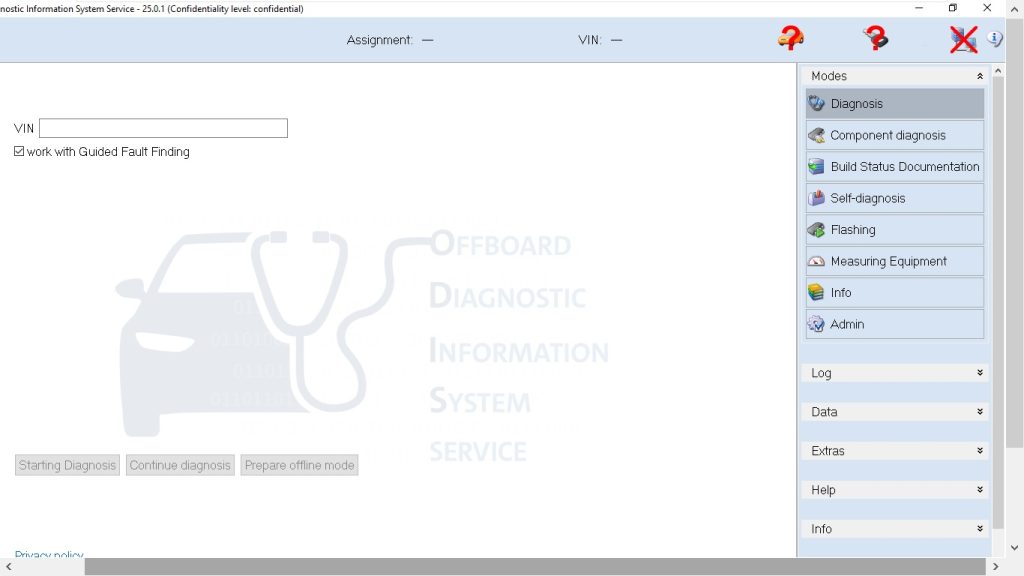
إذا كنت work on VAG Group المركبات — Volkswagen, Audi, Seat, Skoda, Porsche, or Lamborghini — you have almost certainly encountered ODIS. But there are two distinct applications that carry the ODIS name: ODIS Service و ODIS Engineering. They look similar, they share the same codebase heritage, و they are often sold together — but they serve fundamentally different purposes. Using the wrong one لـ a task wastes time و can leave a job incomplete.
What Is ODIS?
ODIS stands لـ Offboard Diagnostic Information System. It is the الرسمي factory منصة التشخيص used by Volkswagen Group dealers و authorised ورش العمل worldwide. ODIS replaced the older VAS 5051 diagnostic الأنظمة و has been the VAG standard since approximately 2012, مع continuous updates ever since.
ODIS connects إلى المركبات via a J2534-compatible VCI (typically the VAS 6154 or third-party equivalents) و communicates directly مع every ECU in the المركبات. It is the only tool that يوفر full, uncompromised access إلى VAG Group المركبات at the OEM level.
ODIS Service 25 — What It Does
ODIS Service is the ورش العمل الفنيين’s tool. It is designed لـ day-إلى-day diagnostic work: reading و clearing رموز الأعطال, performing guided تحديد الأعطال, running actuator tests, performing service resets, و carrying out software updates إلى المركبات ECUs via the Volkswagen online infrastructure.
ODIS Service 25 key functions
- تحديد الأعطال الموجّه (GFF) — step-by-step diagnostic procedures pulled من Volkswagen’s technical database
- Software updates (SWaP/SFD) — flash ECU firmware إلى the latest release via online connection
- Service functions — brake pad reset, steering angle المعايرة, battery registration, gearbox adaptation
- Fault code read/clear — across all الأنظمة including المحركات, gearbox, ABS, airbag, comfort, و infotainment
- Measuring values — live data streams من all sensors
- Variant coding — basic coding of replacement modules using guided templates
Version 25 covers المركبات up إلى model year 2024–2025, including MEB platform electric المركبات (ID.3, ID.4, ID.Buzz) و the latest MLB Evo platform cars.
ODIS Engineering 19 — What It Does
ODIS Engineering is a completely different tool aimed at a different user. Where ODIS Service guides you عبر pre-defined procedures, ODIS Engineering gives you raw, unguided access إلى every المعلمات, byte map, و التهيئة block in a المركبات’s ECUs. It is the tool used by Volkswagen’s own development engineers.
ODIS Engineering 19 key functions
- Direct ECU access — read و write raw coding blocks بدون guided templates
- Long coding manipulation — modify individual bits و bytes in وحدة التحكم configurations
- Adaptation channels — access all adaptation values directly, including hidden or unpublished channels
- Security access bypass — access ECUs that يتطلب seed/key security levels
- Flash البرمجة — ECU reflashing بدون the online SWaP infrastructure dependency
- Experimental / prototype functions — access إلى development-only diagnostic routines
Key Differences — Side by Side
| Feature | ODIS Service 25 | ODIS Engineering 19 |
|---|---|---|
| Primary user | Workshop الفنيين | Engineers, advanced tuners |
| Fault code diagnostics | ✅ Full guided | ✅ Raw access |
| ECU software updates | ✅ Via online VW servers | ✅ Offline flash يدعم |
| Long coding | ⚠️ Guided templates only | ✅ Full raw bit editing |
| Hidden adaptation channels | ❌ No | ✅ Yes |
| تحديد الأعطال الموجّه (GFF) | ✅ Yes | ❌ No |
| Online server dependency | Required لـ SWaP updates | Largely offline capable |
| Complexity | Structured, beginner-friendly | Advanced, raw access |
| Vehicle coverage | Up إلى MY2024–2025 | Up إلى MY2024 |
When إلى Use ODIS Service
Use ODIS Service لـ all routine ورش العمل work. If a customer brings in a VW Golf مع a fault light, an Audi A4 that needs a gearbox adaptation بعد a clutch replacement, or a Skoda Octavia due لـ an airbag module replacement — ODIS Service is the right tool. The تحديد الأعطال الموجّه walks you عبر Volkswagen’s الرسمي diagnostic procedure, which reduces the chance of misdiagnosis و documents your work in the process.
ODIS Service 25 is also the tool إلى use لـ ECU software updates. Volkswagen frequently issues firmware updates لـ المحركات management, infotainment, و driver assist الأنظمة, و ODIS Service handles these عبر its SWaP (Software و Parameter) update function.
When إلى Use ODIS Engineering
ODIS Engineering comes في its own عند you need إلى go beyond what ODIS Service exposes. Common use cases يتضمن:
- Enabling hidden features — activating options that are coded out of the المركبات but physically present (cornering lights, lap timer, needle sweep)
- Replacing used ECUs — writing correct coding إلى a second-hand module that ODIS Service cannot configure بدون an online connection
- Offline flash البرمجة — reflashing ECUs in المركبات بدون online infrastructure access
- Advanced IMMO work — accessing security-protected immobilizer adaptation channels
For binary ECU file editing و المعايرة remapping — modifying fuel maps, boost targets, و torque limits beyond what coding can achieve — ورش العمل typically pair ODIS مع a dedicated binary editor. Our WinOLS + ECM Titanium guide covers this workflow لـ VAG و other European المركبات.
Running Both on One Machine
ODIS Service و ODIS Engineering have historically had التركيب conflicts عند placed on the same Windows environment. The pre-installed VMware image solves this cleanly — both applications run in a single, isolated virtual المعدات مع all dependencies pre-configured و tested. No DLL conflicts, no database collisions, no activation issues.
Get ODIS Service 25 + Engineering 19 — Pre-Installed VM
Our pre-installed VMware image contains both ODIS Service 25 و ODIS Engineering 19 in a ready-إلى-run environment. Download, open in VMware Workstation Player, connect your VCI, و start working.