
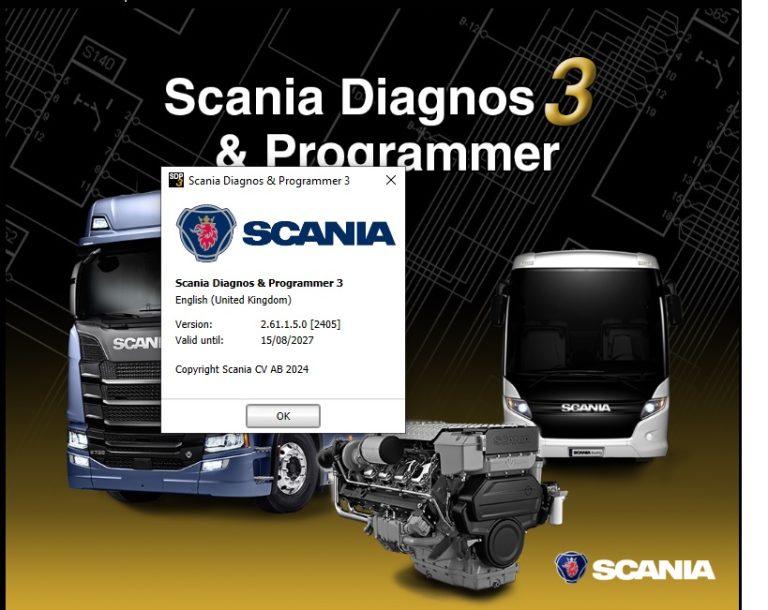
إذا كنت work مع Scania trucks, the question of which SDP3 version إلى run comes up constantly. Both 2.61.1.5 و 2.65 are in active use in ورش العمل worldwide — but they are not interchangeable. Choosing the wrong one لـ your hardware or truck range can mean missing functions, activation failures, or simply not being able إلى communicate مع the ECUs you need. This guide breaks down the differences so you can make the right call.
What Is Scania SDP3?
SDP3 stands لـ Scania Diagnos & Programmer 3. It is Scania’s الرسمي OEM diagnostic و البرمجة software, designed إلى work مع Scania’s VCI2 و VCI3 diagnostic interfaces. It covers the full range of Scania trucks, buses, و industrial المحركات, giving الفنيين access إلى رموز الأعطال reading, المعلمات البرمجة, guided diagnostics, و ECU software updates.
Unlike aftermarket scanners, SDP3 communicates natively مع every Scania وحدة التحكم — المحركات (EMS), gearbox (GMS), retarder, body builder module, و more. It is the only tool that can perform Scania factory-level work.
The equivalent لـ Volvo Group trucks is Volvo TechTool PTT, covering Volvo FH/FM, Mack, و Renault Trucks. Workshops servicing both brands will need both tools running side by side.
SDP3 2.61.1.5 — نظرة عامة
Version 2.61.1.5 is one of the most widely deployed SDP3 releases in independent ورش العمل. It offers stable coverage لـ Scania trucks من the early P/G/R/T series all the way up إلى the New Truck Generation (NTG) models released up إلى around 2020–2021.
Key features of 2.61.1.5
- Full يدعم لـ Scania VCI2 و VCI3 interfaces
- Works reliably on Windows 7 64-bit و Windows 10 64-bit
- Covers Scania Euro 5 و most Euro 6 المحركات
- Comprehensive DTC library مع guided تحديد الأعطال
- Parameter reading و writing لـ EMS, GMS, و chassis modules
- Stable database — well-tested و predictable behaviour
The main limitation of 2.61 is coverage of newer NTG trucks مع the latest SCR/OBD configurations و 2022+ model year updates. If your ورش العمل handles primarily pre-2021 trucks, 2.61 is a solid, reliable choice مع minimal setup friction.
SDP3 2.65 — نظرة عامة
Version 2.65 is the newer release, extending coverage إلى Scania’s latest NTG truck إصدارات و updated المحركات families. It brings an expanded DTC database و refined guided diagnostic paths لـ Euro 6d و later emission الأنظمة.
Key features of 2.65
- Extended coverage of Scania NTG trucks (2022–2024 models)
- Updated Euro 6d SCR/DPF diagnostic routines
- Improved guided diagnostics لـ latest Opticruise و Scania Retarder units
- Enhanced wiring diagram integration
- Requires Windows 10 64-bit (Windows 7 no longer supported)
- Requires Scania VCI3 — VCI2 يدعم is limited in this version
The trade-off مع 2.65 is hardware dependency: it is optimised لـ VCI3 و is less forgiving on older الأنظمة. إذا كنت are running VCI2 or a Windows 7 environment, you may encounter interface recognition issues that لا exist in 2.61.
Version Comparison Table
| Feature | SDP3 2.61.1.5 | SDP3 2.65 |
|---|---|---|
| Truck coverage | P/G/R/T series, NTG up إلى ~2021 | NTG up إلى 2024, latest Euro 6d |
| VCI2 يدعم | ✅ Full | ⚠️ Limited |
| VCI3 يدعم | ✅ Full | ✅ Full (recommended) |
| Windows 7 64-bit | ✅ Yes | ❌ No |
| Windows 10/11 | ✅ Yes | ✅ Yes |
| Euro 6d diagnostics | ⚠️ Partial | ✅ Full |
| Stability / maturity | ★★★★★ Very stable | ★★★★☆ Stable |
| Best لـ | Pre-2021 fleets, VCI2 users | 2022+ trucks, VCI3 users |
Which Should You Choose?
Choose SDP3 2.61.1.5 if:
- Your fleet or customer trucks are predominantly pre-2022 models
- You are using Scania VCI2 hardware
- تحتاج a stable, well-tested environment مع minimal surprises
- You are running Windows 7 or a locked-down shop laptop
Choose SDP3 2.65 if:
- You regularly service 2022–2024 Scania NTG trucks
- You have Scania VCI3 و a Windows 10 or 11 laptop
- تحتاج the latest Euro 6d SCR و DPF diagnostic routines
- Full guided diagnostics on the newest Opticruise gearbox إصدارات matters إلى you
Installation Tips لـ Both Versions
Regardless of which version you choose, a few setup steps apply universally:
- Disable Windows Defender أثناء التركيب — it frequently flags SDP3 database المكونات as false positives
- Run as Administrator — both versions يتطلب elevated privileges لـ the service layer إلى install correctly
- Install VCI drivers first — connect your VCI2 or VCI3 و let Windows find و install the drivers قبل launching SDP3 setup
- Use a wired connection لـ the initial database activation — WiFi installs sometimes time out أثناء the licence check
Can You Have Both Versions Installed?
Technically yes, but it ليس recommended على single Windows التركيب. The two versions share database service المكونات that can conflict. The cleanest approach is إلى use separate المعدات, or — better — run one version natively و the other in a virtual المعدات. This keeps environments isolated و lets you switch بدون reinstalling anything.
For ورش العمل servicing mixed North American or European commercial fleets across multiple brands, JPRO 2025 v2 offers a single brand-agnostic platform covering Scania alongside Freightliner, Kenworth, Volvo, و International — though it لا reach SDP3’s depth لـ Scania-specific المعلمات البرمجة و ECU software updates.
Get Scania SDP3 — Ready إلى Use
Both SDP3 2.61.1.5 و 2.65 are available in our catalogue as pre-configured digital downloads. No activation headaches, no missing المكونات — just download, install, و connect your VCI.