
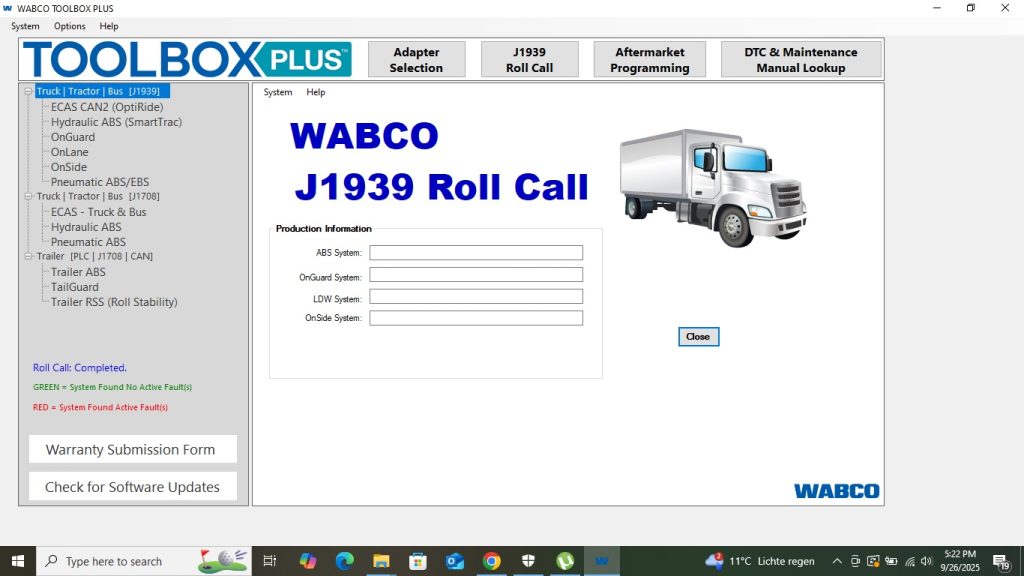
Getting Started مع WABCO Toolbox 13.7
WABCO Toolbox covers ABS, EBS, ECAS, و collision avoidance الأنظمة — more specialized than a general المحركات أداة التشخيص, but essential لـ any shop doing brake or suspension work on modern trucks. يرشدك هذا الدليل خلال your first session in plain terms, the way brake specialists explain it إلى new الفنيين on forums و in shop training.
Before You Start — Checklist
- WABCO Toolbox 13.7 installed, license activated
- Adapter connected: Nexiq USB Link 2/3, DPA5, or WABCO WDC
- Adapter drivers installed in Device Manager — no yellow marks
- Truck: parking brake set, parked safely, key OFF initially
- If تشخيص trailer: ISO 7638 trailer cable connected إلى trailer nose
الخطوة 1 — Connect the Adapter إلى the Truck
Locate the J1939 OBD port on the tractor. On Freightliner Cascadia it’s under the dashboard near the A-pillar. Plug in your Nexiq USB Link. Connect USB end إلى laptop. إذا كنت’re also connecting إلى a trailer, plug the ISO 7638 cable في the 7-pin trailer socket on the front trailer nose.
الخطوة 2 — Open WABCO Toolbox و Connect
- Open WABCO Toolbox 13.7 (run as Administrator)
- Go إلى Options → Communication → select your adapter (Nexiq USB Link, DPA5, or WDC)
- Turn truck key إلى ON position (ignition on, المحركات off is fine)
- Click Connect in the toolbar
- WABCO Toolbox scans لـ WABCO ECUs on the J1939 bus و ISO 7638 (if trailer connected)
- Vehicle tree appears on the left: ABS (tractor), ECAS, OnGuardACTIVE, Trailer ABS (if connected)
الخطوة 3 — Read ABS Fault Codes
- Click ABS in the المركبات tree
- Select Fault Codes tab
- Review Active faults (red) و Inactive faults (grey history)
- Click each fault إلى expand: WABCO code, J1939 SPN/FMI, description, occurrence count, freeze frame data
- ملاحظة every active fault قبل doing any work — freeze frame shows the conditions عند the fault triggered (speed, pressure, temperature)
الخطوة 4 — Run Live Data إلى Verify Wheel Speed Sensors
After reading رموز الأعطال, go إلى Live Data tab in the ABS section. You’ll see real-time values لـ:
- Wheel speed (km/h or mph) لـ each sensor position (FL, FR, RL, RR)
- Brake chamber pressure (PSI) at each wheel
- ABS modulator valve states
With the truck stationary و المحركات running, all wheel speeds should read 0. Have someone slowly roll the truck forward (or spin a wheel by hand) while you watch live data — a working sensor will show speed; a failed sensor stays at 0.
الخطوة 5 — Run Actuator Tests
WABCO Toolbox’s actuator tests let you command valves إلى open/close و verify they respond:
- Go إلى Actuator Tests tab
- Select a modulator valve (e.g., Front Left ABS valve)
- Click Activate — you’ll hear the valve cycle (click/thunk sound من the brake chamber area)
- If the valve is silent or WABCO Toolbox shows an error أثناء activation, the valve or its wiring is faulty
الخطوة 6 — ECAS Suspension Check (if equipped)
Click ECAS in the المركبات tree. For a basic check:
- View live data: height sensor readings, air pressure, leveling valve states
- If the truck is sitting level و the height sensors show uneven readings, المعايرة or sensor replacement is needed
- Full ECAS المعايرة is a separate procedure — only run it بعد all physical repairs are كامل (new air bags, new sensors, etc.) و the air الأنظمة is fully charged (120 PSI minimum)
الخطوة 7 — Diagnose Trailer ABS (if connected)
- Click Trailer ABS in the المركبات tree
- If WABCO Toolbox found a trailer ECU, it appears here. If not, check your ISO 7638 cable connection
- Read رموز الأعطال the same way as tractor ABS
- Common trailer ABS issues: wheel speed sensor contamination (road salt/grease), loose connectors at the ECU box on the trailer frame, corroded ISO 7638 pin contacts
الخطوة 8 — Clear Fault Codes
Only بعد repairs are confirmed:
- Fault Codes tab → Click Clear Faults
- Reconnect و verify no new faults appear
- Run a short test drive (or manually spin wheels) إلى confirm wheel speed sensors are reading correctly و no ABS faults return
Common Beginner Mistakes
- Starting ECAS المعايرة مع low air pressure — Always wait لـ full الأنظمة pressure (120+ PSI) قبل calibrating
- Clearing codes قبل تشخيص the root cause — ABS faults return within one wheel rotation if the sensor or valve is still faulty
- Forgetting إلى check trailer ABS — Many brake complaints originate in trailer ABS; always connect the trailer عند تشخيص a brake الأنظمة complaint
- Disconnecting adapter while WABCO Toolbox is in actuator test mode — Always stop all tests و click Disconnect in software قبل unplugging
الخلاصة
WABCO Toolbox 13.7 is straightforward once you understand the المركبات tree structure: tractor ABS → ECAS → OnGuard → trailer ABS. Each الأنظمة has its own رموز الأعطال, live data, و actuator tests. For detailed رموز الأعطال explanations, see our رموز الأخطاء guide. For quick answers, check the FAQ.