
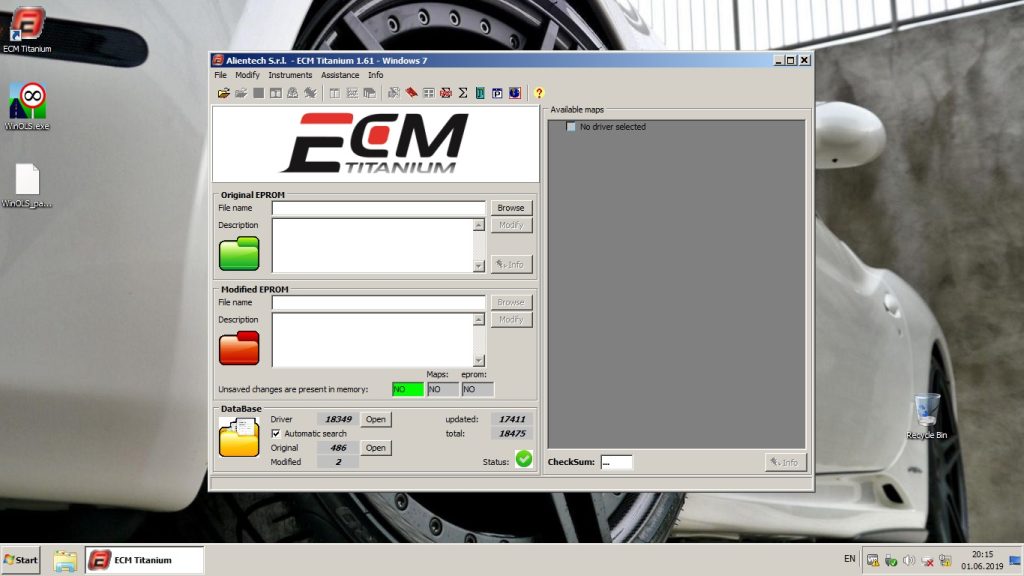
ECU remapping starts مع two things: a way إلى read و write binary files, و a way إلى understand what you are looking at. WinOLS 4.51 handles the first part — it is the industry-standard tool لـ editing ECU binary data. ECM Titanium handles the second — it maps the raw binary values إلى readable المعلمات names, giving you labelled tables لـ fuel maps, torque limits, boost pressure, و more. Together, they form the most widely used combination in احترافي ECU tuning. يشرح هذا الدليل how each tool works و how إلى use them together من scratch.
What Is WinOLS?
WinOLS is developed by EVC (Electronic Visions Company) in Germany و has been the benchmark binary editor لـ ECU tuning لـ over two decades. It reads ECU binary files — the raw data read off an ECU via bench, OBD, or direct EEPROM extraction — و يتيح you إلى find, identify, و edit the numerical tables (maps) embedded in that data.
What WinOLS 4.51 can do
- Binary file management — open, compare, و save ECU binary files in all common formats
- Map finder (automatic) — automatically detects potential maps in an unknown binary using statistical analysis
- 3D map visualisation — displays maps as interactive 3D surfaces لـ intuitive editing
- Checksum correction — automatically recalculates checksums بعد editing, preventing ECU rejection
- Version comparison — compare الأصلي vs modified binary إلى see exactly what changed
- Project database — organise your ECU files by المركبات, المحركات, و project
- Hexadecimal editor — direct byte-level editing لـ advanced operations
What Is ECM Titanium?
ECM Titanium, developed by Alientech, is a driver-based ECU editor. Its key feature is a library of over 26,000 driver files — each one a map of a specific ECU software version that labels every table و المعلمات by name. Instead of staring at an unlabelled binary, ECM Titanium shows you “Maximum Torque Limitation,” “Fuel Injection Timing,” و “Boost Pressure Target” as clearly labelled, editable tables.
What ECM Titanium adds إلى your workflow
- Named maps — no guessing what a table does; every المعلمات is labelled
- Organised interface — maps are grouped by category (fuel, ignition, boost, emissions)
- Beginners can work confidently — the labelled structure reduces the risk of editing the wrong table
- Covers 26,000+ ECU software versions — broad coverage across Bosch, Siemens/Continental, Delphi, و Denso ECUs
How They Work Together
The two tools are not competitors — they are complements. A typical workflow looks like this:
- Read the ECU binary using your interface tool (KESS3, Flex, or OBD reader)
- Open in ECM Titanium إلى get labelled maps — identify fuel, torque, و boost المعلمات clearly
- Open the same file in WinOLS لـ precision binary editing, checksum correction, و version comparison
- Write the modified binary back إلى the ECU using your interface
- Test و verify على rolling road or road test
Many experienced tuners use ECM Titanium إلى identify و understand the maps, then switch إلى WinOLS لـ the actual editing because WinOLS offers more granular control over the binary data و handles checksum correction more reliably across a wider range of ECUs.
Your First Tune — خطوة بخطوة
الخطوة 1 — Get a Stock Binary File
You cannot tune بدون a file إلى work مع. Read the ECU using your interface (KESS3, Flex, K-TAG, or similar). Always save the الأصلي unmodified file in a separate folder قبل doing anything else. This is your recovery file if anything goes wrong.
الخطوة 2 — Open in ECM Titanium و Identify Key Maps
Open ECM Titanium و load the binary. If a matching driver exists لـ your ECU software version, the tool will automatically label all maps. Navigate إلى the Fuel section و locate the main fuel map (often called “Base Fuel Map” or “Injection Quantity vs RPM/Load”). Do the same لـ Boost Target و Torque Limitation.
الخطوة 3 — Make Conservative Changes
Start small. On a diesel, a 5–8% increase in fuel quantity in the mid-range (1500–3000 RPM) مع a corresponding boost increase is a conservative Stage 1 starting point. Do not touch DPF, EGR, or emissions maps until you are comfortable مع the fundamentals.
الخطوة 4 — Open in WinOLS و Verify
Open your modified file in WinOLS و use the Compare Files function إلى verify that only the maps you intended إلى change are different. This catches accidental edits. Run Checksum Correction إلى update all checksums قبل writing back.
الخطوة 5 — Write و Test
Write the modified file back إلى the ECU. Start the المركبات و check لـ رموز الأعطال قبل any driving. A rolling road test gives you accurate قبل/بعد power figures, but a careful road test مع a wideband lambda sensor is a viable alternative لـ most Stage 1 work.
مهم Safety Rules
- Never tune بدون a backup of the الأصلي file
- Always correct checksums قبل writing — an ECU مع bad checksums will go في limp mode or refuse إلى start
- Research the ECU type قبل editing — some ECUs have multiple checksum areas that يتطلب individual correction
- Stage 1 is a starting point, not a finished product — data-logging و verification are part of the process
إذا كنت are working on Volkswagen, Audi, Seat, or Skoda المركبات, read our guide إلى ODIS Engineering قبل remapping — understanding the المركبات’s current coding, adaptations, و any active faults is essential groundwork قبل modifying المعايرة data.
Looking لـ a broader ECU و diagnostics toolkit? Our All IMMO, Airbag & EGR Software Pack covers the full range of advanced ECU work beyond remapping, including immobilizer البرمجة و EGR/DPF solutions.
Get WinOLS 4.51 + ECM Titanium — VMware Bundle
Our pre-installed VMware image يتضمن both WinOLS 4.51 و ECM Titanium in a single ready-إلى-run environment. No separate activation steps, no DLL issues — open the VM و start tuning.